Recoveryfix PST Password Recovery
Download Free Trial – Recover PST Passwords up to 500 MB for FreeRecover lost or forgotten Outlook PST passwords to get complete access to your PST file instantly. The software helps to remove invalid PST passwords or reset existing passwords. It supports both ANSI & Unicode PST files and smoothly works with large PSTs.
- Recover multiple PST file passwords at once.
- Remove and reset PST password without altering items.
- Resets lost PST passwords without knowing the original.
- Recover lengthy and multilingual PST passwords.
- No data loss during password recovery.
- Unlock encrypted PST file passwords.
- Supports PST files of all Outlook versions.
- Works on all Windows OS.
When to Use PST Password Recovery Software?
Unlock Password-protected PST files after System Crash
Sometimes, there are instances where users lose their saved Outlook PST files password after the system crashes. Re-accessing them can be a challenging task. The PST file password recovery tool helps to recover password from PST file quickly without any tech knowledge.
Regain forgotten Outlook PST passwords
Working on the different PST files creates situations in which users might forget the password of specific PST files. It restricts them from accessing the PST file data. With this Outlook PST file password recovery tool, recover any PST password & use the PST file as before.
Access Old PST files of former employees
Suppose you need the PST file data of former employees, but accessing them without knowing the original password is the real challenge. Add any number of desired PST files of any size & get their passwords all at once.
Features of Recoveryfix PST Password Recovery Software
Check out the features of the Outlook password recovery tool to seek maximum benefits.

Recover PST File Password Quickly
Retrieve PST passwords instantly with the PST File Password tool. It helps in processing encrypted Outlook data files with no change in emails, attachments, or folder hierarchy.

Reset PST File Password As Needed
Use the free PST password recovery software to reset PST password smoothly. Just select the PST files and set & verify the new password to change the current one.

Remove PST Password for Instant Access
Remove encrypted PST-file passwords in one click. Get instant access to the PST file data like emails, attachments, and more without needing to enter any password.

Supports Bulk PST File Password Recovery
The Outlook Password Recovery allows users to add and recover PST file passwords in bulk. No limitations on PST file size. Just add the file & manage passwords in no time.

Get Password-Free PST Files Instantly
Remove passwords from the added protected PST files with this tool. Create password-free files and enable unrestricted access of PSTs to the shared users.

Retrieve All Types of Password Combinations
Handle any complex passwords easily. Be it multilingual or lengthy, the tool recovers PST passwords quickly and helps access its data instantly.

Unlock PST Files Without Original Password
No need to remember, locate, or find the original password to access protected PST files. The software eliminates the need of an old password to access the contained data.

Compatible with all Outlook & Windows Versions
The password recovery tool is fully compatible with all Outlook versions, namely Outlook 2021, 2019, 2016 & earlier ones. Run the tool on any Windows OS easily.

Free Trial Version Available
Download the free trial version and remove, recover, or reset the password from the PST file up to 500 MB for free. For no size limitations, upgrade to the licensed version.
Common Password Recovery Challenges
Check out the below section to eliminate the frequent Outlook PST access challenges with our tool.
Password Recovery Challenges
- Forgotten PST Password
- Lost Access of Legacy or Inherited PST Files
- Multiple Protected PST Files Management
- Concerned About Mailbox Content
- Need Better Security Control
- Large or Complex PST Archives
How the Software Fixes Them
- Recover lost Outlook PST credentials instantly.
- Retrieve PST passwords without the original one.
- Perform batch PST password recovery at once.
- Get instant mailbox data access without data loss.
- Replace old or compromised PST file passwords.
- Recover complex passwords from large PST files.
4 Easy Steps to Recover PST Password Securely
Here are the simple steps to recover passwords of multiple PST files using the PST password recovery tool:
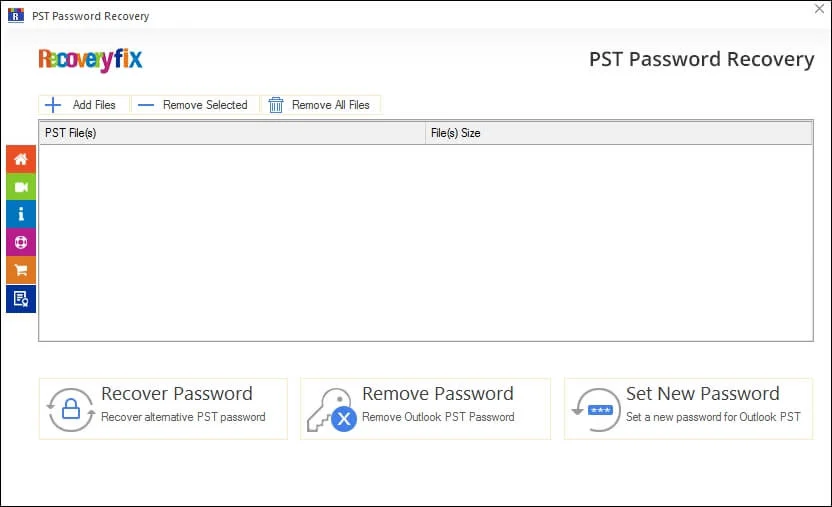
- Step 1. Launch the software & add desired PST files.
- Step 2. Select the Recover Passwords tab.
- Step 3. PST file Password recovery process starts.
- Step 4. Save Report to CSV file for future reference.
Customer Feedback for Recoveryfix PST Password Recovery
Get insights of our tool capabilities with these honest reviews.
“I forgot the PST file password of our foremost clients, as I used to work on several PST files. So, I searched the internet for the best password recovery tool & I got the Recoveryfix one. It recovered multiple PST files passwords quickly. No complex & lengthy steps. Truly impressive!”
Hannah Brown, USA
Awesome software! It really works.
“I have been using Outlook services for many years. So, I used to manage lots of PST file data daily. I missed one of the most important archived PST file passwords. I was truly worried about the data. One of my friends then suggested the Recoveryfix tool to me. I used it & within a few clicks; I got the results. Even if the file size was too large, it was managed safely.”
Samuel Davis, Canada
Best tool to recover PST password.
"A former employee leaves the organization without sharing the credentials for password-protected PST files. But after finding the Recoveryfix, it is quite easy for me. The software helps me to access the PST file's data instantly. You should also try this tool."
Thomas Weber, UK
Affordable tool to reset PST password.
"I forgot the password of old archived PST files and was not able to access the crucial data. The Recoveryfix tool unlocked them within a few minutes. Its clean interface made the process straightforward even for beginner users. "
Laura Bianchi, USA
Happy to find it.
Evaluate Now Free trial version
Here is the overview of the free & licensed version of the Outlook PST password recovery tool features.
| Software Features | Free version | Licensed version |
| Recover PST password | ✔ | ✔ |
| Remove PST file password | ✔ | ✔ |
| Reset PST password | ✔ | ✔ |
| Save report to CSV file | ✔ | ✔ |
| Add multiple files | ✔ | ✔ |
| Batch password recovery | ✔ | ✔ |
| PST file size limitation | Up to 500 MB | Unlimited |
Download Free  |
Upgrade now  |
FAQs: Get Quick Answers
Let’s discuss the most common queries that users have about the functionality & reliability of our PST Password recovery