
Recoveryfix PDF Repair Software
Easily fix PDF file corruption with the automated PDF file repair tool!
Repair corrupt, broken or highly damaged PDF files with 100% success rate. Restore each component of the PDF file in the original format. With easy-to-use interface and no size restrictions, the PDF repair tool guarantees data security and does not store any kind of user’s data.
- Repair multiple PDF files at once.
- Extract images, text, digital signatures, etc.
- Store the repaired PDF files at the preferred location.
- Compatible with all the available PDF versions.
- Fix broken PDF files of any size or corruption level.
- Work with all the Windows OS platforms.
- Simple user-interface ideal for all users.
- Maintains the formatting of the PDF file components as before.
Know the top use cases of PDF repair software!
-
Fix corrupt user manuals or product guides!
To run any product successfully, end-users need a PDF for guidance. However, irregular file transfer-like situations can make PDF data unreadable. Our feature-rich PDF recovery software stands out here to retrieve layout, diagrams & instructional contents at the desired location.
-
Restore legal documents & affidavits!
PDFs used in legal proceedings should remain intact to avoid any serious consequences. But if it happens, our best PDF repair tool can help to restore the data from the Affidavits, court fillings or contracts. As a result, it can help in avoiding data loss situations before scheduled hearings.
-
Handle broken academic research papers!
Students & researchers often store their thesis documents or journal papers in PDF format. But if files get corrupted due to improper management, it can impact them a lot. The PDF repair software can fix the issue & provide data, formatting, and annotations as earlier.
What services make this PDF Repair Software unique?
Explore the stand-out features that make it an ideal PDF repair utility for everyone.
-
Automated detection or scanning
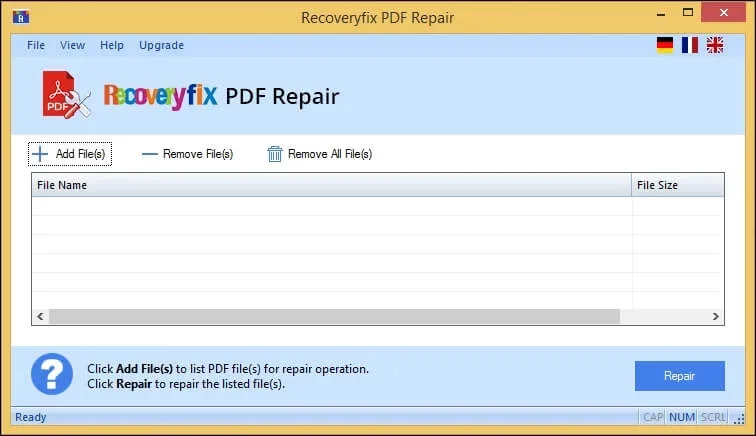
Scans the PDF corruption automatically & repairs it instantly. Just add the desired files & get the results with a few clicks.
-
Supports batch processing of PDF files
Fix corrupted PDF files in bulk at once. Use the Add files option & select the number of desired PDF files & repair them altogether.
-
Preserves data hierarchy or formatting
Open corrupted PDF files in the same formatting. Get each PDF file component like text, images, annotations, diagrams, metadata, digital signatures, etc. as before.
-
Filter the unwanted PDF files
Remove file or Remove All file options allow you to remove unwanted PDF files at your convenience. Choose the File & select the provided options.
-
Multi-language Support
No language barrier while using the PDF file repair tool. Use German, French, or English, etc. as the user-interface medium to feel comfortable.
-
Desired saving location
Move the corrupted PDF file after repairing it to the preferred location. Make the new folder using the PDF repair software for structured results.
-
Access the repaired file directly
Use the repaired PDF file directly using the prompted link at the end of the process. The link redirects users to the saved location.
-
Track the PDF repairing
Track the complete PDF repair process from start to end with the PDF file repair tool. Check out the status of the repaired PDF file.
-
Repair PDF file of any format or version
Repair damaged PDF file instantly, irrespective of its format & version. This PDF file repair tool works smoothly with formats like PDF/A, PDF/X, PDF/UA, PDF/E, etc.
-
Full data recovery of PDF file
Recover corrupted PDF file data such as text, images, charts, graphs, annotations, etc. completely. Save at the specified location with original hierarchy.
-
Use with any Windows Platform
Use the PDF tool on any Windows OS. Versions include Windows 365, 11, 10, 8.1, 8, 7, Vista, XP, 2000, 98, NT, 95 (FAT 16, FAT 32, NTFS, NTFS5) & Windows Server 2022, 2019 & older.
-
Get the tool’s free trial version
Experience the top-rated features of the tool with its free trial version. Users can access its complete utility except for watermark-free output with the demo version.
Benefits of using the Recoveryfix PDF repair Software!
Here is the list of benefits users get from using the best PDF repair tool.
- Repair PDF files in bulk with a few clicks.
- Fix PDF file corruption of any file size.
- Detect the corrupt or broken PDF file automatically.
- Retains PDF file formatting the same as before.
- Innovative DIY user-interface.
- Extract each PDF file component, such as text, images, etc.
- Offers 24*7 free technical support.
- Handle all the available PDF formats & versions.
Customer Feedback! Recoveryfix PDF Repair Tool
Loyal customer feedback can do wonders for you. See what our users think about us.
“My PDF file was showing errors & refused to open after my system crashed. I tried multiple tools, but the Recoveryfix PDF repair tool did the right job. It restored text, images, and annotations accurately. The process was smooth & error-free. It's a truly impressive tool!”

Eli V. Danek, UK
Awesome application! It really works.
“I had a corrupted PDF file with embedded links & graphs. Its data was critical for me. Thanks to the Recoveryfix PDF repair tool, I repaired my PDF file & recovered each component with no data loss. Highly recommended tool for handling critical documents.”

Devon P. Moreau, Canada
Best tool to repair PDF files.
Evaluate Now Free trial version
Evaluate the features of the trial & licensed version and choose as needed. 
| Software Features | Free version | Licensed version |
| Add single/multiple PDF files |  |
|
| No file size limitation | |
|
| Extract all PDF files component | |
|
| Retains PDF formatting | |
|
| Offers 100% data security | |
|
| User-defined saving option | |
|
| All PDF versions compatibility | |
|
| Works on all Windows OS | |
|
| Filter unwanted PDF files | |
|
| Save healthy PDF files | With a Watermark | No Watermark |
Download Free  |
Buy now  |
FAQs Recoveryfix PDF Repair Tool!
Let’s discuss the most common queries that users have about the functionality & reliability of the PDF Repair tool.
If you still have any more queries, just contact us


Follow the steps to repair corrupted PDF files:
- Step 1- Download and install the tool & Add PDF files.
- Step 2- Tap on Repair & process starts.
- Step 3- Save at the desired location.
- Step 4- Get the repaired PDF files.
- PDF file is damaged and cannot be repaired.
- Format error: not a pdf or corrupted.
- “The file is damaged and could not be opened” error.
- There was an error processing this page. There was a problem reading this document (109).
- PDF file is not readable with Acrobat Reader.
- Invalid Function resource error when opening the file.
The tool’s real-time algorithms & back-end programs work with various PDF versions efficiently.
No. You can add multiple PDF files to the tool with no file size restrictions.
Following the are the basic signs of PDF file corruption:
- Inability to open the PDF file.
- Prompts error message while opening.
- Irregular content display.
- Delay in loading times.
- Links or buttons stopped working.
- Show blank pages & missing annotations.
- Incorrect rendering & unexpected file size.
The tool’s free trial version allows you to repair damaged PDF file & save the file at the desired location. But with a watermark. For watermark free output, go with the licensed one.
PDF repair tool’s versatile & advanced features maintain original PDF data formatting.
Once you opt for our PDF repair software, there is no requirement for any additional tool to repair the PDF files.