Recoveryfix PDF Recovery Tool
Recover PDF files' data with 100% accuracy and efficiency.
Recoveryfix PDF Recovery tool is an advanced utility that allows users to recover damaged, corrupted, or inaccessible files instantly. The software restores the PDF file elements like text, images, vector graphics, and other data exactly the same as the original.
- Add multiple PDF files to recover them at once.
- No file size restrictions to restore PDF files.
- Supports different versions of PDF files as per ISO standards.
- Switch between English, French, and German language at any time.
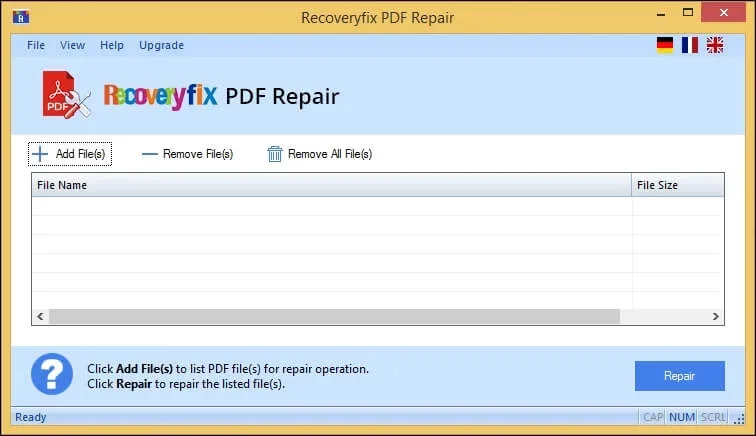
- Restore files in three simple steps: Add, Recover, and Save.
- Retrieve logical data, visual content, metadata, and file structure.
- Shows live progress of the recovery process for easy monitoring.
- Recover damaged PDF files and store them in the desired location.
Ideal Scenarios Where PDF Recovery Tool Proves the Best?
Recover Important Business Contracts
A damaged PDF contract can delay approvals or create compliance risks. System crashes, failed downloads, or email corruption make the PDF files unreadable. The PDF Recovery Software restores text, images, and other details without interrupting the original structure. It allows businesses to access critical agreements instantly after the recovery.
Restore Academic or Research Documents
The PDF file format is quite popular among students and researchers to store assignments, thesis drafts, or study materials. However, incomplete transfer or storage issues can corrupt or damage the PDF file and lead to data loss. The PDF File Recovery Tool helps to get data back from such files within a few clicks.
Retrieve Archived Financial Records
Organizations keep invoices, tax documents, and financial statements in PDF format. Sudden system-related issues make these important records inaccessible. With the PDF Recovery Software, users can recover data from corrupted PDF files along with proper formatting. It permits you to continue operations like reporting, record-keeping, and audits by restoring the PDF files' content.
Feature Glimpse of Recoveryfix PDF Recovery Tool
Check out the top benefits of the software that highlight its superiority over its peers.
Recover Corrupted PDF Files
The PDF File Recovery Tool allows you to recover data from corrupted PDF files instantly. Add the files to the software, and it will restore the data of PDF files, regardless of the corruption level.
Restores Multiple PDF Files at Once
Add multiple PDFs to recover all of them simultaneously. The software is designed to handle the recovery of several files without number or size restrictions
Available in Multiple Languages
The tool supports three different languages, including English, German, and French. Choose your native language and recover PDF documents comfortably with the software.
Compatible with All PDF Versions
The software permits you to recover damaged PDF files of any version. It works with different PDF file versions, such as 1.0-1.3, 1.4, 1.5, 1.6, 1.7, and 2.0.
Maintains PDF formatting & Structure
Recover unsaved PDF files with the help of the PDF Recovery tool. The software keeps the file elements like text, raster images, fonts, vector graphics, and more intact.
Monitor Live Recovery Progress
Observe the entire PDF retrieval process using the PDF File Recovery tool. The tool shows the real-time PDF recovery progress on your screen.
Save Restored Files to Any location
Retrieve PDF files data with a 100% secure process and store them in the desired location. Save the restored data to local or external drives and Network Attached Storage easily.
Generate Multiple Resultant PDF files
Recover maximum possible data from broken PDF files. The software produces multiple outputs of the same PDF that help users select the most suitable version.
Try Before You Upgrade
The PDF Recovery Software comes with a free trial version. Download and check out the software capabilities today, with certain limitations like watermarked output.
Recoveryfix PDF Recovery Tool Built For Guaranteed Results
Here are the benefits of the software that make it the best available option.
- Delivers quick results with maximum retrieval of PDF file data.
- Works with all PDF file versions created by different applications.
- Safe and non-destructive retrieval process ensures no data alteration.
- Recover severely corrupted, inaccessible, or broken PDF files instantly.
- Standalone PDF recovery solution to restore data from damaged PDF files.
- Restores text, images, and formatting accurately with a 100% secure process.
- Handles the recovery of large or password-protected PDF files without any issues.
- Simple and user-friendly interface suitable for both technical & non-technial users.
Recoveryfix PDF Recovery Vs Online Repair Tools: Find The Best
| Criteria | PDF Recovery Software | Online Repair Tools |
|---|---|---|
| Data Security | Runs locally on your system. | Requires uploading PDF files to the server. |
| Corruption Handling | Fix severely corrupted or complex PDF files. | Often fails on heavily damaged files. |
| Size Limitation | No limitations to add PDF files. | Supports the addition of PDF files up to a certain limit. |
| Offline Restoration | Works without the internet. | Requires a stable online connection. |
| Accuracy | Recovers text, images, and fonts in original layout. | PDF file often loses formatting or content. |
| Batch Recovery | Multiple file recovery in one go. | Supports batch support rarely. |
| Speed & Stability | Fast repair without errors. | Slower due to server queues. |
| Assistance | Dedicated customer support. | Limited or no support. |
| Dependency | Standalone tool | Depends entirely on the online service. |
Customer Feedback! Recoveryfix PDF Recovery Tool
Explore the genuine feedback of the software and decide for yourself.
“I had a client contract PDF that wouldn’t open after a system crash. The PDF File Recovery tool recovered the file data quickly with original formatting and structure. It saved me from requesting the documents again. A reliable utility for PDF-related issues.”

Michael Turner, USA
“One of my archived financial PDFs became corrupted during file transfer. The PDF Recovery Software allows me to recover PDF documents without damaging the layout. The final results are surprising as I get multiple outputs for the same PDF. It helped me choose the best one as per my requirements. Dependable Solution.”

Sofia Martinez, Spain
Evaluate Now Free Trial Version
Compare the differences between the free and licensed versions to pick the suitable one according to your needs. 
| Software Features | Free version | Licensed version |
| Supports batch recovery of PDF files. | ✔ | ✔ |
| Restore PDF files without size restrictions. | ✔ | ✔ |
| Recover all elements from PDF files. | ✔ | ✔ |
| Keeps original formatting and structure. | ✔ | ✔ |
| 100% secure tool for sensitive files. | ✔ | ✔ |
| Works with different PDF file versions. | ✔ | ✔ |
| Available in different languages. | ✔ | ✔ |
| Save recovered PDFs without a watermark. | ❌ | ✔ |
Download Free  |
Buy now  |
FAQs Recoveryfix PDF Recovery Tool
Get quick answers to the common queries asked by users related to the software.
If you still have any more queries, just contact us
 1-866-348-7872
 support@recoveryfix.com
Here are the detailed steps to recover PDF files:
- Step 1. Download and install the software on your system.
- Step 2. Add Files to the software and restore them.
- Step 3. Monitor the live progress on your screen.
- Step 4. A pop-up message will appear on the screen once it is completed.
- Step 5. Click on the link to access the file location.
The software recovers PDF files and fixes issues like header corruption, damaged object streams, broken cross-reference tables, truncated downloads, damaged pages, unreadable content, and many others.
Yes, the tool allows you to recover maximum possible data, including annotations, form fields, and metadata, from the damaged PDF files.
Yes, it supports the recovery of all PDF versions generated by different applications or platforms.
Sure, add the password-protected files and enter the correct password to proceed with the recovery process.
Yes, you can add and restore multiple PDF files at once with no file size restrictions.
The recovery of PDF files completely depends on the size, damage severity, and system specifications. However, larger files take additional time to process.
It is rare but a possible case. Therefore, the tool generates multiple resultant files for maximum possible recovery.
We offer 24/7 customer support that will assist you in situations like this. You can connect with us over chat, email, or a phone call.