Microsoft Outage November 2026: Was It A Cyberattack?

Published On - November 17, 2026
On November 12, 2026, at 10:05 UTC (5:05 a.m. ET / 2:05 a.m. PT), Microsoft users began facing a widespread disruption that made everyday operations unexpectedly difficult. Outlook inboxes failed to load, emails were delayed, and access to services such as Teams, SharePoint, and Copilot was affected.
The disruption raised several questions among users of Microsoft:
- Was Outlook down for everyone?
- Were Teams and SharePoint affected too?
- Had service been restored, and would delayed emails still arrive?
If you are someone who is looking for clear answers rather than scattered updates, then this article is for you. Here, the guide explains the incident timeline, affected services, the Microsoft outage root cause, recovery updates, and where to find the latest status updates.
What Is The Microsoft Outage In November 2026? – A CliffNotes Version
Microsoft explained that the November 2026 outage was one of the Office 365 service disruptions globally. The Microsoft 365 outage timeline is as follows:
- Start: Nov 12, 2026, 10:05 UTC (5:05 a.m. ET / 2:05 a.m. PT)
- End: Nov 13, 2026, 16:10 UTC (11:10 a.m. ET / 8:10 a.m. PT)
- Preliminary post-incident report last updated: Nov 16, 2026, 04:48 UTC (Nov 15, 11:48 p.m. ET)
The incident affected users across regions and connection methods, according to Microsoft. Most users won’t be able to access Exchange Online mailboxes through Outlook or other email clients. Some connected Microsoft 365 features were also affected.
The disruption was tracked under two incident IDs:
- EX1550543: Exchange Online mailbox access issues.
- MO1550821: Wider disruption that affects multiple Microsoft 365 services.
Important to Know: The outage was serious, but the available findings do not indicate that it happened because of cyberattacks or AI Agents. Microsoft confirmed that the disruption was an infrastructure and software failure.
Get Complete List: Which Microsoft 365 Services Were Affected?
Exchange Online was the most affected service in the November 2026 Microsoft outage. Users experienced problems while accessing their mailboxes and sending or receiving emails. Along with that, other Office 365 services that depend on Exchange Online or networking infrastructure were also disrupted. To learn more, check out the table below:
| Microsoft 365 Service | Reported Impact |
|---|---|
|
Outlook & Exchange Online |
Mailbox access failures and delayed email delivery. |
|
Microsoft Teams |
Some features were affected, although chats and meetings continued to work for many users. |
|
SharePoint & OneDrive |
Connected features and access scenarios were disrupted. |
|
Microsoft Copilot |
Features that relied on affected Microsoft 365 services experienced disruption. |
|
Microsoft Defender & Purview |
Certain features that depended on Exchange Online were affected. |
|
Other Microsoft 365 services |
Fabric, Intune, Planner, To Do, Power Apps, Power BI, and Universal Print were also listed in Microsoft’s incident report. |
Important to Know: Not every feature stopped working completely. Microsoft explained that the level of disruption varied by region, connection method, and time.
Complete Microsoft 365 Outage Timeline: From First Alert To Full Recovery
The disruption began on November 12 and continued till November 13. Microsoft restored the affected services on November 13, but it continued monitoring the infrastructure and processing delayed email messages. After that, it issued the final customer updates on November 14.
Here is the simplified timeline based on Microsoft’s preliminary Post-Incident report.
| Timeline (UTC) | Events Occurred |
|---|---|
|
November 12, 1:07 AM |
Teams traffic moved from an alternative networking gateway to the primary gateway also used by Exchange Online. |
|
November 12, 4:20 PM |
Microsoft detected a serious connectivity issue and opened incident EX1550543. |
|
November 12, 6:27 PM |
Expanded incident communication to cover additional services, including Teams, Copilot, and Defender. |
|
November 12, 7:00 PM |
Microsoft paused ongoing and planned deployments and configuration changes during investigation. |
|
November 12, 7:20 PM |
Identified that many servers had become unavailable and shifted more traffic onto the remaining infrastructure. |
|
November 13, 1:00 AM |
Microsoft identified an overwhelmed connection-handling process as a major contributor to the access failures. |
|
November 13, 7:20 AM |
Applied an update that reverted the defective change on part of the infrastructure. |
|
November 13, 11:35 AM |
Availability in Europe returned to healthy levels. |
|
November 13, 2:17 PM |
Global webmail availability returned to expected levels. |
|
November 13, 4:10 PM |
Microsoft confirmed that customers were no longer experiencing active impact and moved into extended monitoring and backlog recovery. |
|
November 14, 4:15 AM |
After monitoring service stability, Microsoft issued its final customer update. |
The above timeline shows why the recovery took longer than a typical Microsoft 365 service interruption.
What Caused the Microsoft Outage in November 2026?
According to the preliminary investigation (also stated by EVP Charles Lamanna), Microsoft identified three main factors behind the outage. Go through the following section to learn about them in detail:
Reason 1. A Hidden Software Defect Affected Networking Gateway Servers
A software change rolled out in July contained a hidden flaw in the servers that handle Microsoft 365 connections. The flaw remained unnoticed under normal conditions. But when combined with heavy system stress, it puts loads on servers that lead to unexpected crashes and freezing issues.
Reason 2. Teams Traffic Increased the Load on the Primary Gateway
About 15 hours earlier, Teams traffic moved to the primary gateway, which also handles Exchange Online. The combined heavy workloads of these two pushed servers far beyond their normal operating limits.
Reason 3. Reduced Server Capacity Made the Situation Worse
Around 14% of the gateway’s servers were already unavailable from an unrelated issue the day before. That alone wouldn’t cause an outage, but combined with higher load and the flow failures spread as traffic shifted. So, at peak, over 80% of servers became unresponsive.
Is Microsoft 365 Outage Over? – Know the Current Status
Yes, Microsoft marked the affected incidents as resolved and confirmed that customers were no longer experiencing an active impact. The available report is still labeled as preliminary by Microsoft. It stated that the final Post-Incident Report would provide further details.
Current Status: Today’s update on the Microsoft Outage November 2026 is that all of Office 365 is restored and operational. For real-time insights into widespread active incidents, you can check out the Microsoft 365 Status page on X.
To Know More, Download the Preliminary Post-Incident Report
Here are the detailed steps to download Microsoft’s preliminary Post-Incident report using the Microsoft 365 admin center.
Step 1. Sign in to Microsoft 365 admin center.
Step 2. Tap the Show all option to proceed.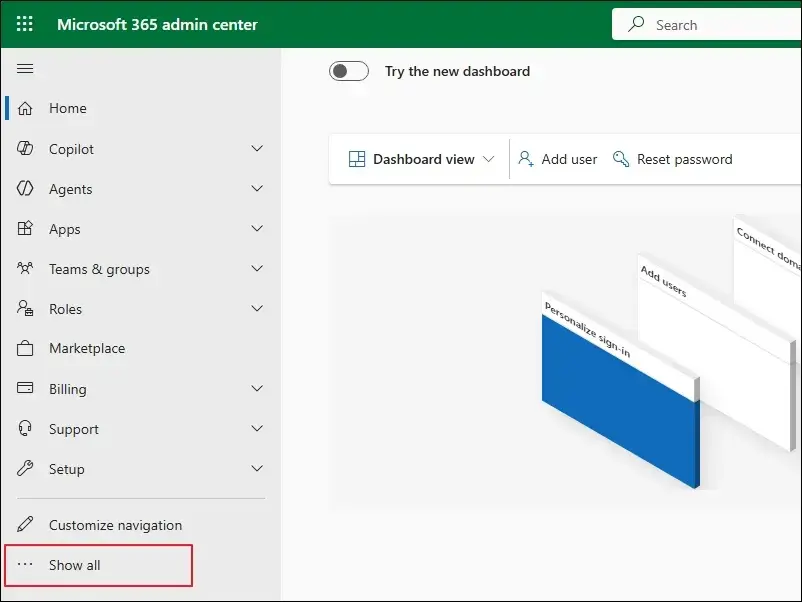
Step 3. Navigate to Health section and click on Service Health.
Step 4. Access the Issue history tab and locate the incident IDs for the preliminary report.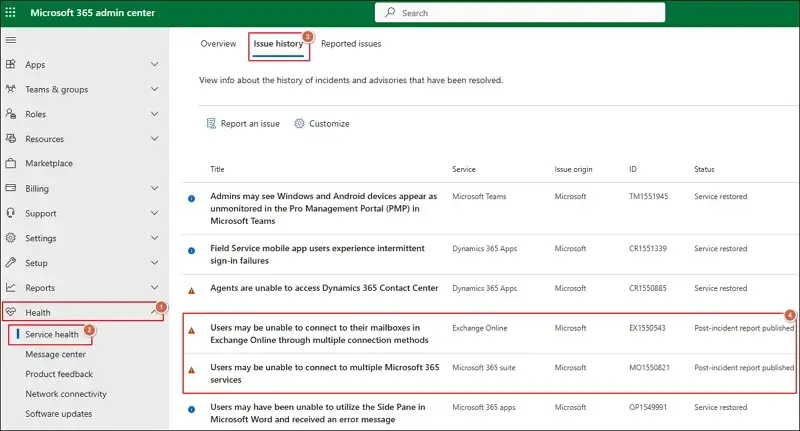
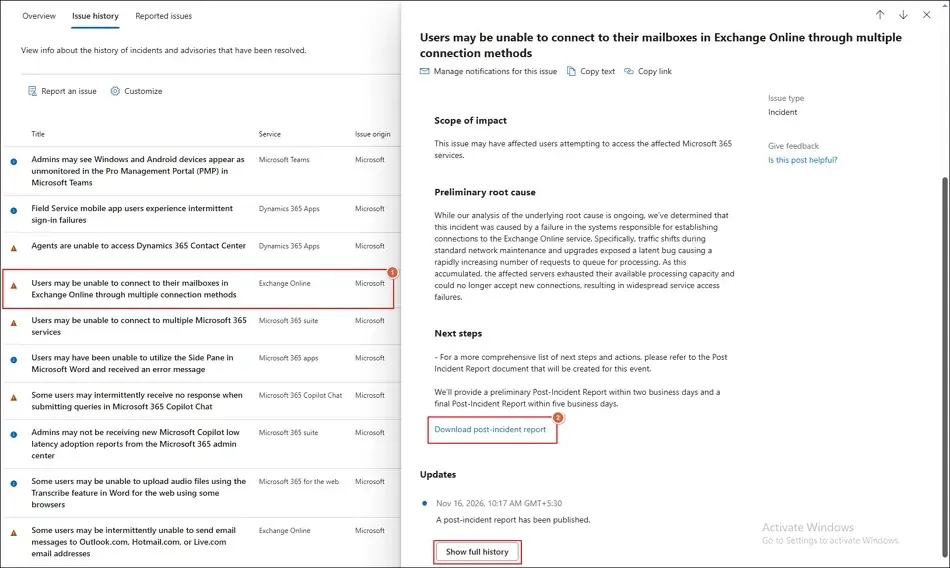
For downloading Exchange Online report
- Find and click on the Incident ID: EX1550543.
- Then, proceed to Download post-incident report.
For downloading Microsoft 365 Suite report
- Search and tap on the Incident ID: MO1550821.
- Then, click on Download post-incident report.
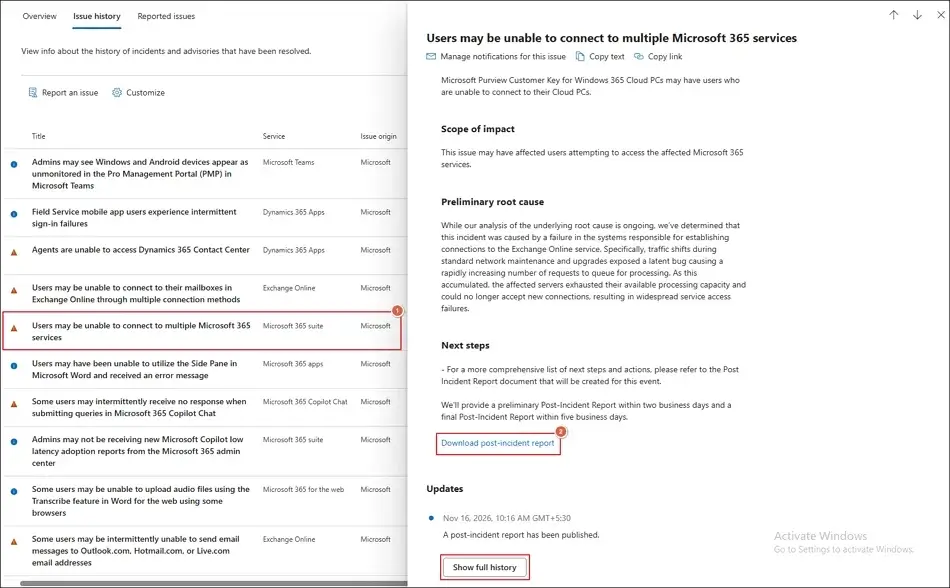
Note: Navigate to Show full history section for more details.
Step 5. It will save the report in DOCX format.
Important to Know:: You can check the latest service information through the Microsoft 365 Service Health Status or other trackers like Downdetector to track outage live.
How to Protect Your Microsoft 365 Data Before the Next Outage?
The recent Microsoft outage in November 2026 teaches us the importance of data backup. So, why wait for the next disruption? Back up your data today with our Recoveryfix Microsoft 365 Backup tool. The software helps you back up Office 365 emails, contacts, calendars, and journals in different formats.
Concluding Thoughts On The November 2026 Microsoft Outage
We hope that our guide helps you learn all the necessary information about the recent Microsoft 365 outage. The disruption was caused by a combination of a hidden software defect, increased network traffic from Teams, and reduced gateway capacity.
Therefore, having a business continuity plan and backup for such scenarios is necessary for every organization. To backup Microsoft 365 mailboxes, you can use the recommended software.
FAQs: Quick Answers For Microsoft 365 Outage
Q- Why did the recovery take so long?
A- Microsoft 365 outages take longer to recover because Microsoft has to restore unresponsive servers and distribute traffic safely. Not only that, but they also allow delayed email to be processed.
Q- What should you do if Outlook or Microsoft 365 is still not working?
A- Try the following steps before making any major changes to your email account.
- Confirm Microsoft 365 service status.
- Verify the internet connection stability.
- Try Outlook on the Web (OWA).
- Restart the Outlook application and check for queued emails.
- Check Offline Mode and connection status for Outlook.
- Contact your Microsoft 365 Administrator.
Q- How long did the Microsoft outage last?
A- The incident lasted for about 24 hours, as per Microsoft’s preliminary report. But recovery and monitoring continued till 14 November 2026.