Fix a Hacked Office 365 Account: Get complete info!

Published On - April 13, 2026
Since email accounts often contain sensitive information, if it gets compromised it can lead to serious security risks. It can be data theft, phishing attacks, & unauthorized access to crucial files.
Here, we will deal with one similar concern, i.e how to fix a hacked Office 365 account. Each & every aspect will be covered, including symptoms, immediate actions, practical solutions, & additional tips to ensure future safety.
Suggestion: Try to follow the guide sequentially to understand the root cause of the issue. Then, apply the suitable methods to regain access to compromised Office 365 accounts.
Know the symptoms for hacked Office 365 account
Check out the following symptoms. If you have any, it implies that you are dealing with the hacked Office 365 account situation.
- Suspicious login activity from unknown locations or devices.
- Passwords no longer work that shows their infringement.
- Unauthorized emails are sent to your different contacts.
- Important email messages may disappear or be moved to unknown folders.
- Hidden rules have been set to forward incoming emails to an external source.
Don’t wait to make things worse, take quick action, like:
- Check the connected apps & permissions & remove suspicious ones.
- Contact the IT team immediately if you are using a business account.
- Check & remove suspicious inbox rules with Mail > Rules option.
- Verify email forwarding settings with the Mail > Forwarding tab.
- Review the security notifications to identify the unauthorized activity.
- Disconnect suspicious devices to prevent further unauthorized access.
Step–by-step methods to fix a hacked Office 365 account
Here, we have suggested the most effective & workable methods to fix a compromised Microsoft Office 365 account.
Method 1. Reset your Office 365 password instantly
I would recommend changing the password as your first step to deal with the issue. Let’s know how to execute it with the following steps:
Note: For 100 % success, try this method using Incognito mode, with a known location & within the recovery limit [two times per day].
- Open the Microsoft account recovery page with the provided link:
https://account.live.com/password/reset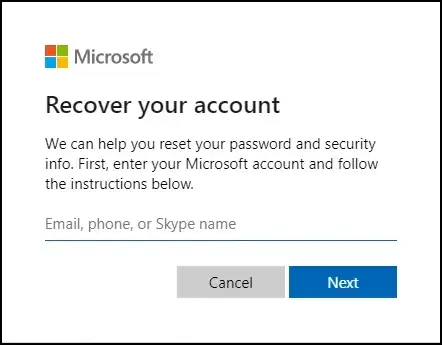
- Provide your Office 365 email address.
- Authenticate your identity using security verification methods.
- Create a new strong password & sign-in using the newly created password.
Method 2. Enable Multi-factor authentication
Multi-factor authentication brings additional security to your account. It will ensure that even if hackers know your password, they still can’t access your account. Follow the steps below to enable it:
- Sign in to Microsoft 365 with the needed credentials, then hit Next when you receive the pop-up of More information required.
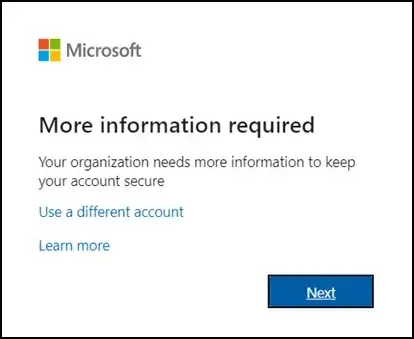
- Here you can select two methods for extra security:
- Microsoft Authenticator App that you have to install & configure with the same account. [Default One]
- Use the “I want to set up a different method” option, in which you can provide your number to get an SMS with a 6-digit security code.
- Now, whenever you sign-in to Microsoft 365, you will be prompted to provide the verification code as per the chosen option.
Method 3. Verify Account Sign-in Activity
In this method, you can track the sign-in activity for various purposes. It can be for detecting unusual locations, IP addresses, or device types. Moreover, you can manage them if you find any inconsistencies. Know how:
- Login to account.microsoft.com & search for the Security tab.
- Go to the Sign-in activity & choose the Sign-in activity.
- Select “This wasn’t me” or “Secure your account” if you found any unwanted activity.
Method 4. Scan the device for a virus or malware
In most of the cases, it is seen that malware or keyloggers captured your login credentials. So, you need to take care of it by checking the following requisites, like:
- Run a full antivirus scan on your computer.
- Remove any detected threats as soon as possible.
- Update your security system to the latest version.
- Then, after fulfilling all the requisites, restart the system.
It can be the last recovery option where you need to take the help of Microsoft’s official support to fix a hacked Office 365 account. As a result, they will assist you in account verification & easy recovery. You need to provide details like the Account email address, suspicious activity timeline, and verification information.
The best way to save data from these concerns: Regular Backups
If you do not take care of your data with the right approach, there may be a time when you can face these kinds of situations. As a result, you can lose your crucial data. But what is the right approach?
The regular archives in Office 365 will allow you to store the data according to your needs with 100 % security at your desired location. Choosing the advanced solutions over the manual is more profitable. It offers different filters & features through which you get specific & hassle-free results.
Recoveryfix is the name that always stands out with innovative software like Microsoft 365 backup. It permits you to take a backup of the complete Office 365 components like Primary mailboxes, Archive mailboxes, & public folders to the desired destination without any data loss. Check out its core features & innovative user-interface with its free trial version.
Security measures after successful recovery
Take the following security measures to avoid these concerns in the future:
- Regularly check the login activity for suspicious behavior.
- Train your employees on cybersecurity & use secure networks.
- Notify your office personnel about the Office 365 hacked account.
- Review passwords across other accounts; if they are the same, update them.
- Update security information like your recovery email or phone number.
- Avoid phishing emails & keep your software updated to the latest version.
Final thoughts on hacked Office 365 account scenario
A compromised Office 365 account can lead to privacy breach issues. For its easy handling, we have discussed the complete information about the concern from reasons to practical solutions. The changing password approach is more suitable to fix a hacked Office 365 account manually. Otherwise, try the suggested automated backup solution to ensure future safety.
FAQs
Q- How long will the recovery of the Office 365 compromised account take?
A- It depends on the severity of the breach. In most cases, password reset & security verification can restore access within a short timeframe.
Q- I changed my password. Does the threat still occur?
A- Yes. If the malware remains in your device or malicious rules are still active, hackers might regain access. That’s why additional security & regular backups are important.
Q- Is it possible to recover those emails that hackers deleted?
A- Yes. But it depends on the archive & deletion policies for Office 365 mailboxes [Usually 15-30 days]. Go to the Deleted Items > Recoverable Items folder to get back into the inbox again.