How to fix – Exchange SMTP error 550 5.7.1 Unable to Relay error

Updated On - January 9, 2026
The SMTP error 550. 5.7.1 unable to relay is widely recognized. An SMTP error code of “550 5.7.1” is generated when an email message is unsuccessful in reaching the recipient’s email server. Various problems, including incorrect message queue and unauthorized usage, can cause this error 550 5.7.1 accessed denied issue. Usually, you’ll get an error message that gives more information about the problem.
- 550: The “550” part of the error code is the SMTP status code, indicating that the requested action was not taken by the server because there was a permanent failure or error condition on the recipient’s end.
- 5.7.1: The “5.7.1” part of the error code is the specific error code within the “550” range. It denotes that the sender is not authorized to send email to the recipient’s address.
Typically, this error indicates a security setting in your organization or recipient’s organization is preventing your message from reaching the recipient.
Cause of SMTP error
- Authentication failed, or the recipient might lack permission to receive messages.
- The outgoing mail server does not acknowledge the sender’s address.
- The email was incorrectly forwarded to an inappropriate server.
- Sending an email to a large group of recipients.
Method to fix SMTP 550 5.7.1 error
We are providing instructions to fix SMTP Error 550 5.7.1 unable to relay. However, you may require expert technical support to execute these steps. To run the commands and steps mentioned below, you will require administrator access and authorization.
- Verify the event logs.
It is essential to check the application event log and look for solutions online whenever an exchange server problem is essential. In this matter, you can examine the cause of the “Exchange SMTP error 550 5.7.1 unable to relay” notice and quickly fix any problems. - Reach the admin of their account.
Email delivery may be unsuccessful if the outgoing mail server does not recognize the sender’s address. In this case, get in touch with the receiver or ask their administrator to adjust the recipient’s mailbox and resolve the issue on their end.
If the problem continues, it is probably caused by corruption in the Exchange database file. - Repair Exchange Server using ESEUTIL
If none of the above solutions resolve the SMTP error 550 5.7.1 unable to relay, there could be an issue with the Exchange database file (EDB). Database corruption may result from common causes such as power failures, force shutdowns, outdated antivirus software, or server malfunctions, which can then produce the “Exchange SMTP Error 550 Unable to Relay” problem. Microsoft’s ESEUTIL is an Exchange built-in utility that may be used to repair database corruption. ESEUTIL, located in C:\Program Files\Microsoft\Exchange Server\VXX\Bin, can also be used to check the Integrity of the Database, defragment it, and reduce its size. The VXX represents the version of the Exchange Server.- Database defragmentation using ESEUTIL /C
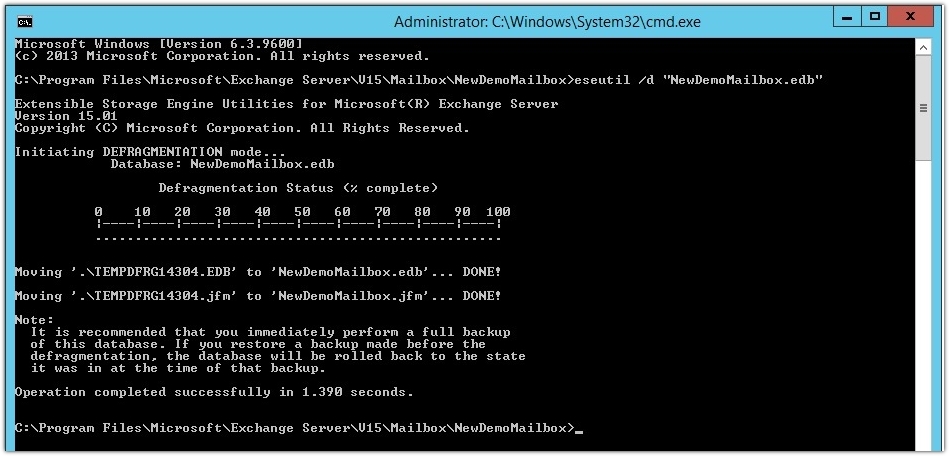
Note: – To defrag an Exchange Server database. The database must be dismounted. - Verify the Integrity of the Database ESEUTIL /g < path to database file>
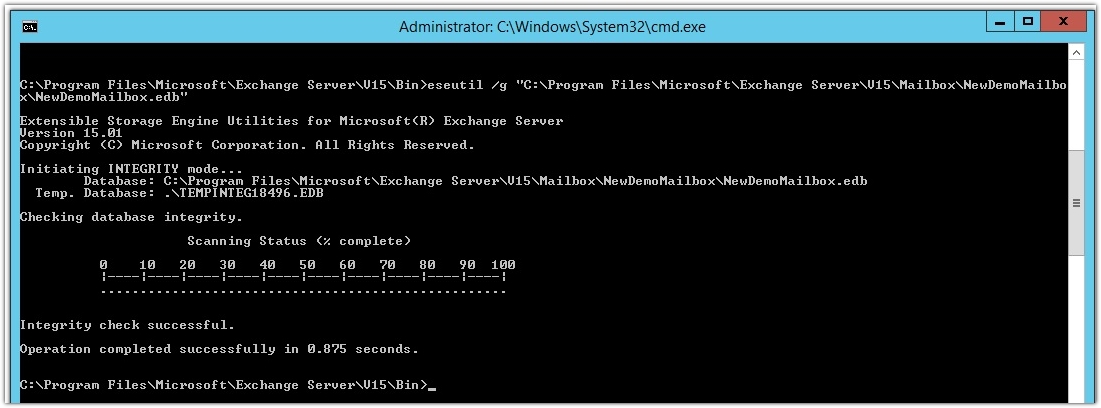
- Soft Recovery Using ESEUTL /P
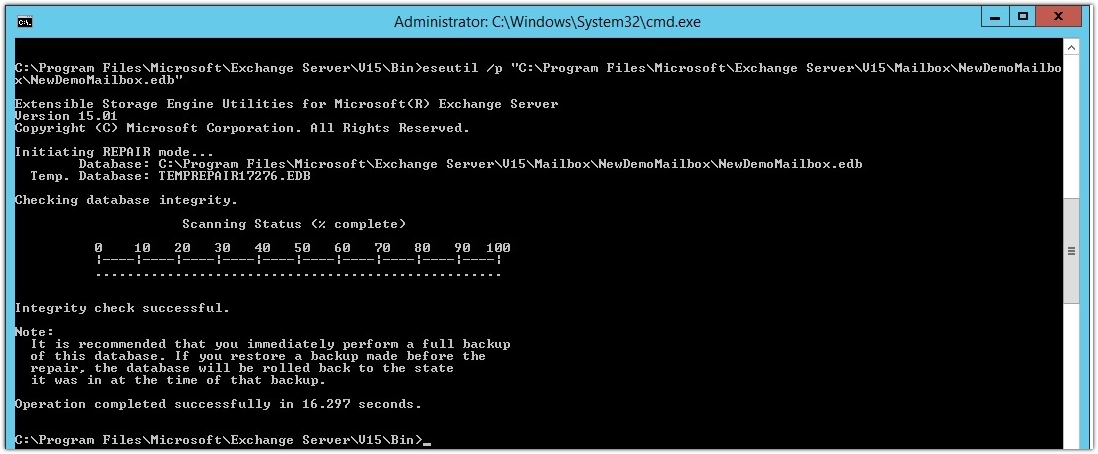
- Perform a hard recovery using ESEUTIL /C
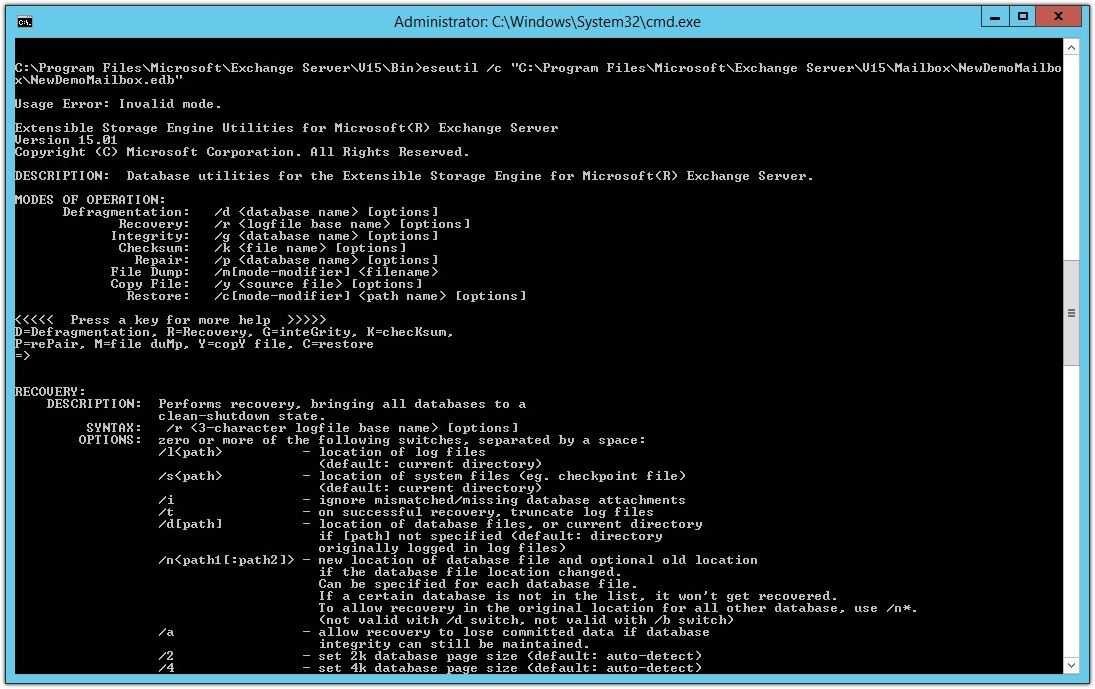
Hard recovery could result in data loss during recovery. So, I would like to suggest you use the software recovery tool Recoveryfix for Exchange Server to prevent data loss.
Note: Hard recovery may result in data loss during recovery. - Database defragmentation using ESEUTIL /C
- Resolve SMTP Error with Exchange Server Manager
Here are the steps to fix 550 5.7.1 Unable to relay error using the Exchange Server Manager.- Step 1. Access the Exchange Server Manager.
- Step 2. Navigate to Administrative Groups under the Exchange Server Manager.
- Step 3. Choose Administrative Group Name> Server> Server Name.
- Step 4. Then, go to Protocols and click on SMTP.
- Step 5. Right-click on Default SMTP Virtual Server and tap on Properties.
- Step 6. Locate the Access tab and proceed to Relay option. Then, select only the list below.
- Step 7. Then, choose the IP Address/Domain Name that you want to add.
- Step 8. Enable the Allow all computers which successfully authenticate to relay regardless of the list above option.
- Step 9. Close all the tabs and check if the issue is fixed.
Advanced Solution: Repair Corrupt Exchange Databases Instantly!
You can use the ESEUTIL command to fix corrupt databases or remove data inconsistencies. But if the Exchange database files are severely damaged or corrupted, then using the Recoveryfix Exchange Server Recovery will be the best approach. The Exchange Recovery software also helps to recover lost or deleted mailboxes easily.
Conclusion
We have covered a detailed guide to fix SMTP Error 550 5.7.1 Unable to Relay. You can try them first to pick the best native solutions as per your requirements.
However, if the provided solutions fail to fix the issue, then the Exchange database files are highly damaged. In these scenarios, go with the recommended solution. It helps you recover emails from a damaged database without data loss.