Can You Bcc on an Outlook Calendar Invite? Explained

Published On - June 3, 2026
- Resources for classic or desktop Outlook.
- Hide Attendee List for new Outlook or web.
- Optional button in desktop Outlook.
This article tells ‘how can you Bcc on an Outlook calendar invite’. Get hand-on expertise with the detailed step-by-step process now.
Have you ever tried to send a meeting invite in Microsoft Outlook with a hidden email address and realized there is no Bcc ( Blind Carbon Copy) option? This is a common issue that almost every Outlook user faces.
Last week, Ben from the HR team faced this exact issue when he tried to schedule a company-wide training. With external attendees and internal employees on the same invite, he paused for a moment: How can I send this while hiding everyone’s email, just like Bcc mails?
According to Microsoft, meetings are massive, and millions of meetings are scheduled daily via Microsoft 365, yet privacy in Calendar invites remains a common concern. Unlike emails, Outlook doesn’t support traditional Bcc for meetings, which results in unintended visibility of the attendee list.
So, can you Bcc on an Outlook Calendar invite? The answer is Yes, but not directly; there are practical workarounds on how to Bcc in Outlook calendar invite that you need to execute!!
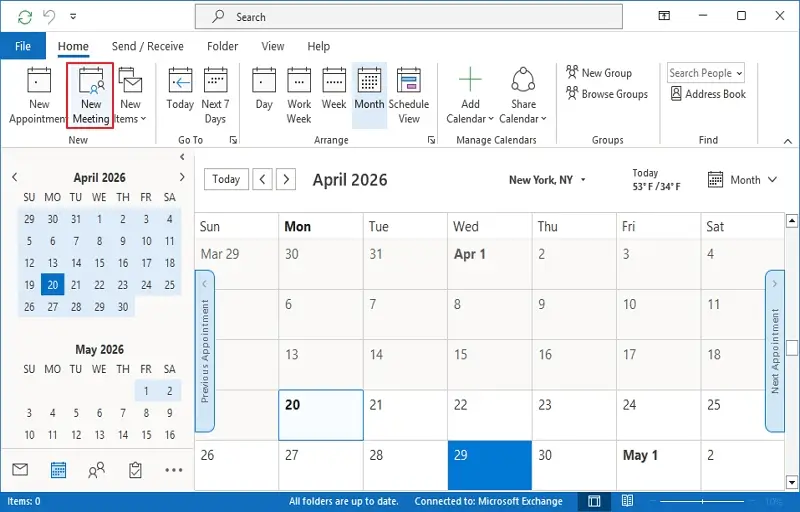
- In Outlook, go to Calendars and tap on New Meeting.
- Specify invitees you want everyone to see in the Required field.
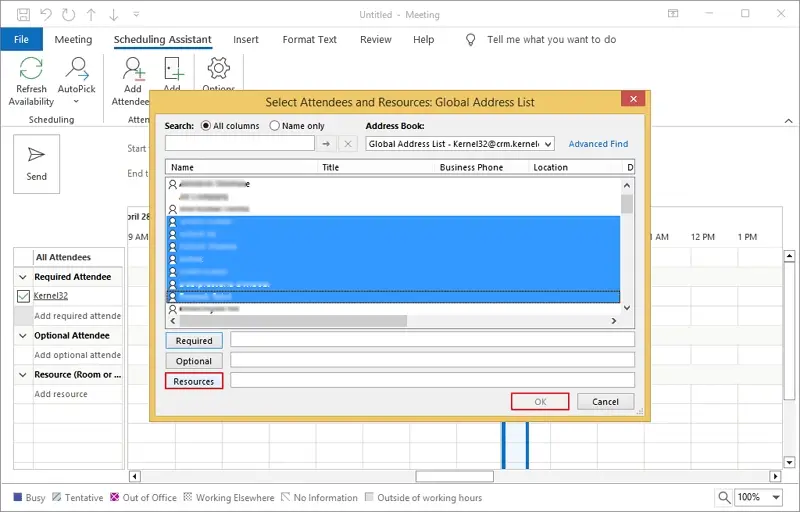
- Tap on Optional, select the invites to whom you want to hide, and tap on Resources. Click OK.
Why Doesn’t Outlook Offer Outlook Calendar Invite Bcc?
Outlook’s calendar item is built for transparency and collaboration, not invisibility. When you send a meeting invite:
- All attendees are available to each other.
- Responses (accept/decline) are tracked.
- Scheduling works based on shared availability.
Imagine you are planning for webinars, confidential meetings with external stakeholders or clients, and you don’t want to reveal each other’s email addresses. The privacy of every participant is your top priority.
As with email, you can add Bcc, but in meetings, Outlook doesn’t offer a calendar invite with Bcc.
How Can You Bcc on an Outlook Calendar Invite | 100 % Reliable Workaround
Be it desktop Outlook or Outlook for web, here are a few stepwise processes that you can try out to Bcc in the Outlook Calendar invite. Go through them and choose at your convenience:
Desktop Outlook: Bcc Outlook Calendar Invite via Resources
If you’re the one who uses Outlook for desktop, then this method is for you; you can use this Outlook calendar to invite Bcc. Here is how to Bcc on Outlook calendar invite:
- Open Outlook, go to Calendar, & tap on New Meeting.
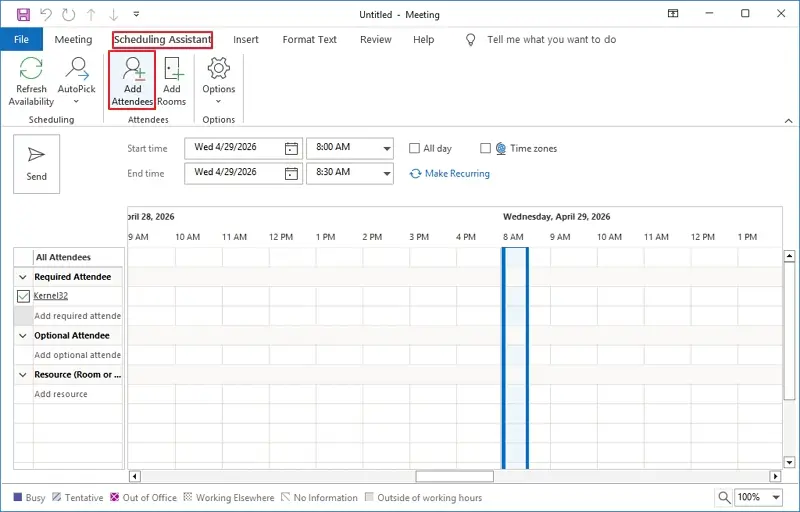
- Go to the Scheduling Assistant tab and tap on Add Attendees.
- Select the names of meeting participants, and click Resources, then OK. It acts as a Bcc on an Outlook Calendar Invite.
- The invitees’ names will be listed. Double-check them and input other details for the meeting, and then send the meeting invite.

Your selected invitees won’t know who is in the meeting, like Bcc in a regular email.
Outlook for Web: Bcc Calendar Invite Outlook via the Hide Attendees List Option
There are a vast number of users of Outlook for web, including largely corporate and education-focused users. If you use Outlook for Web for your daily conversations and meeting invites, you can use the steps below to Outlook calendar invite Bcc:
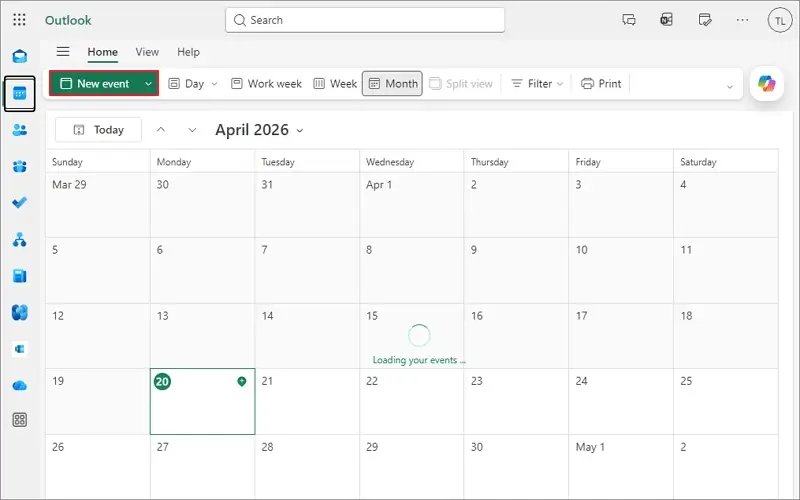
- Open the Outlook for Web in your browser, go to the Calendar tab, and tap on New Event.
- Expand Response options and slide the toggle on for Hide Attendee List.
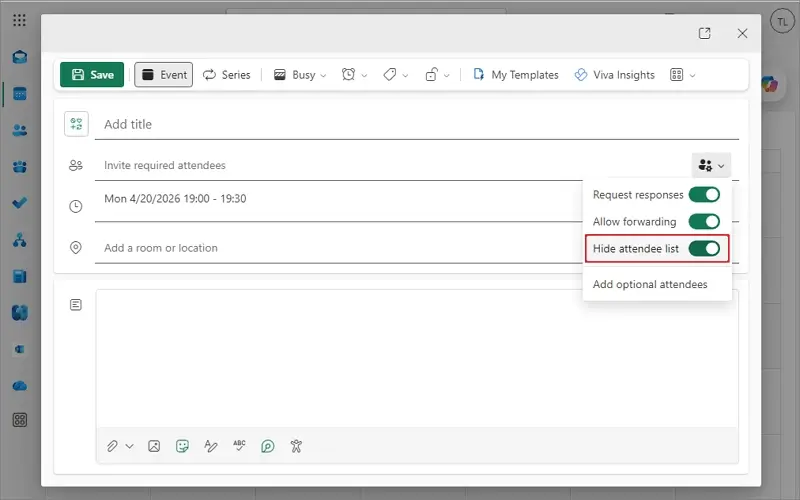
Now complete your meeting invitation process as you like. The attendees will not be able to see the other participants in the meeting.
Real World Scenario: Privacy Isn’t the Only Concern At All Times
Now let’s go back to Ben and understand the further scenario:
Ben has successfully sent a private meeting invite, using the Hide attendees list. However, after one week, his manager asked for the meeting details and attendees’ communication for purposes like record-keeping or compliance.
Ben might be stuck in a situation like:
- Meeting data deletion.
- Lost mailboxes of some attendees.
And the most important thing, if Ben needs to restore that exact invite later. So, here privacy is a challenge, but data safety is another crucial matter of fact that Ben should look into.
Since Microsoft 365 offers cloud storage, it doesn’t guarantee protection from accidental deletion, long-term retention, or easy recovery of data. Microsoft also recommends the shared responsibility model, which states that customers are responsible for protecting their own data, including backups.
Smart Solution to Backup Office 365 Data With No Hassle
Just like Outlook doesn’t offer a direct Bcc feature, you perform a workaround for Outlook calendar invite Bcc; data protection in Office 365 also needs an additional data security layer. And that’s where effective backup is the go-to way.
Recoveryfix Microsoft 365 Backup is one such smart and feature-rich solution that easily backs up emails, calendars, meeting invites, notes, etc.. This tool helps to backup Hosted Exchange mailbox, On-premises Exchange, & Microsoft 365 items to various file formats, like PST, PDF, MSG, EML, HTML, etc. For more insights into the features, take the free trial today.
Take Control of Your Meetings and Office 365 Data From Today
Hence, you can’t direct Bcc to Outlook calendar invite, but you’re not stuck yet. Now you know very well ‘how can you Bcc on an Outlook calendar invite’. With the built-in features like Resources & Optional for desktop Outlook and Hide attendee list for OWA, you can easily hide meeting participants.
But you don’t need to stop here. If your meeting privacy matters, your Office 365 data security matters too. With a safe backup using the Recoveryfix Microsoft 365 Backup tool, all your Office 365 data remains secure and recoverable. So, be smart and make your Outlook workflow safer today.
FAQs About How to Bcc on an Outlook Calendar Invite
Q- Can I Bcc recipients in Microsoft Outlook calendar invites?
A- No, Outlook doesn’t provide any direct or native Bcc option for meeting invites. All attendees will be visible until you hide them manually.
Q- How can you Bcc on an Outlook calendar invite?
A- You can enable Hide Attendee List in OWA and use the Optional feature in Outlook for desktop to Bcc on an Outlook calendar invite.
Q- What is the best alternative to Bcc in Microsoft Outlook?
A- For the best alternative to Bcc in Outlook, you can:
- Send individual invites.
- Use Hide Attendee List in OWA.
- Share a Bcc email with a calendar link.
- Use the Optional button in desktop Outlook.
Q- Is there any way to send bulk meeting invites privately?
A- Yes, via the Hide Attendee list option from OWA, or you can send Bcc emails with an Outlook Calendar .ics file or meeting link for bulk meeting invites.
Q- Is my meeting data protected in Microsoft 365?
A- Yes, your meeting data is protected in Microsoft 365, but you can backup as a safer practice.