How to Perform Virgilio Mail Backup? – A Complete Guide!

Published On - December 8, 2025
Virgilio Mail remains one of the most trusted email platforms with over 11 million users in Italy. However, recent cyberattacks like smishing, data leaks, and phishing attacks made users worry.
Backing Up Virgilio Mail is the industry-recommended solution to protect sensitive information.
So, the question is how to backup mailbox data?
Here, the guide will help you find practical ways to backup mailboxes and make sure that your data remains secure in difficult times.
Virgilio Mail Backup: Identify Real Benefits & Necessity!
A proper mailbox backup strategy helps you stay protected from online threats and keep data accessible. Besides that, you can avail yourself of the following benefits:
- Security against unexpected loss: It protects crucial data from hacking, accidental deletion, or corruption.
- Keep important conversations safe: Preserve stored bills, confirmations, passwords, and work messages from serious trouble.
- Protection from service outages: Data is always available, even during technical issues or downtime.
- Easy recovery during device switch: Already backed up data helps you change devices smoothly.
- Maintain data for a longer period: Limited storage space forces users to delete old emails. A mailbox backup allows you to store data for future purposes.
Know Important IMAP Settings for Virgilio Mail Users!
Before you configure the account, review the Virgilio Mail backup & other IMAP settings for Outlook/ other email clients. Here are all the necessary details:
Username: Type the complete username with the domain (e.g. xyz@virgilio.it).
Password: It is mandatory to use the current password.
|
(IMAP Settings) |
Incoming Mail Server |
Outgoing Mail Server |
| Server | Server: in.virgilio.it | out.virgilio.it |
| Port | 995 with SSL | 465 with SSL |
2 Best Ways to Backup Virgilio Mail Manually!
Although Virgilio Mail doesn’t provide any direct support to export mailbox items. But you can go through the following methods to backup the mailbox data.
Method 1. Use Thunderbird to Backup Virgilio Mail
Thunderbird email client allows users to import or export mailbox items from different platforms. Here’s how to export emails:
Note: Configure your email account using the correct Virgilio Mail IMAP Settings.
Step 1. Open the Thunderbird application on your system.
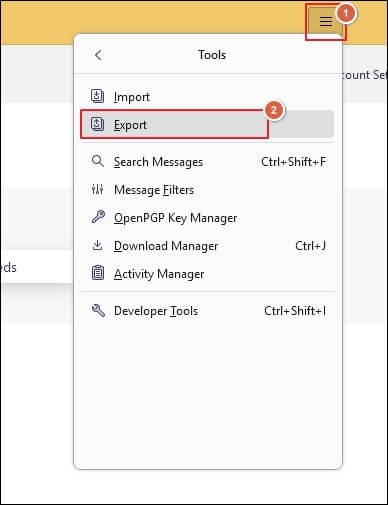
Step 2. Display the Thunderbird Menu and go to Tools. Then, click on Export.
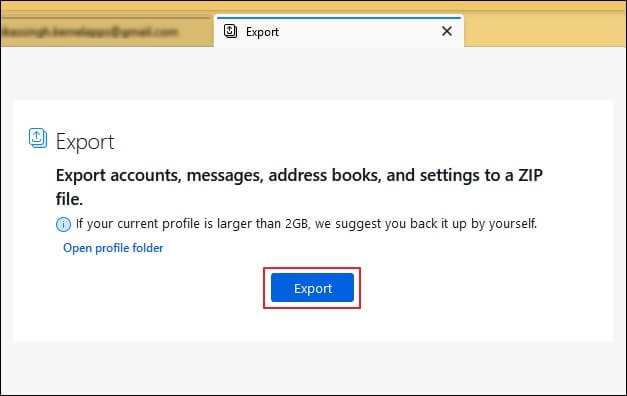
Step 3. Tap on Export to backup the mailbox data.
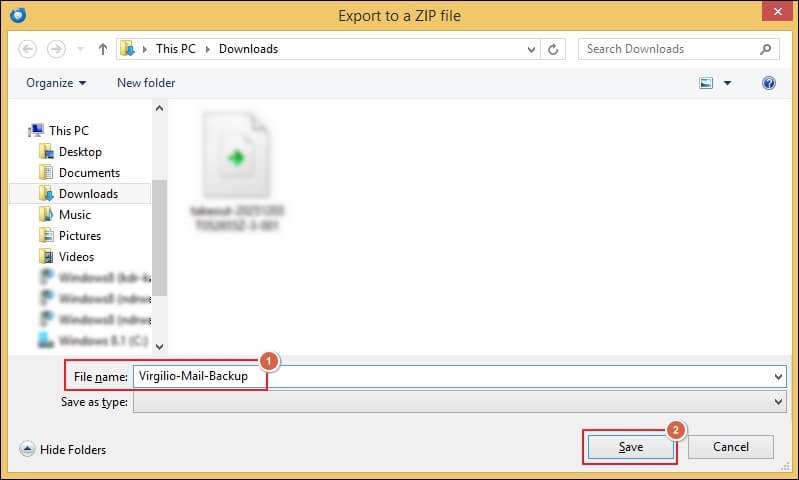
Step 4. Enter the appropriate File name and tap on Save.
Step 5. It will start the process of exporting mailbox content.
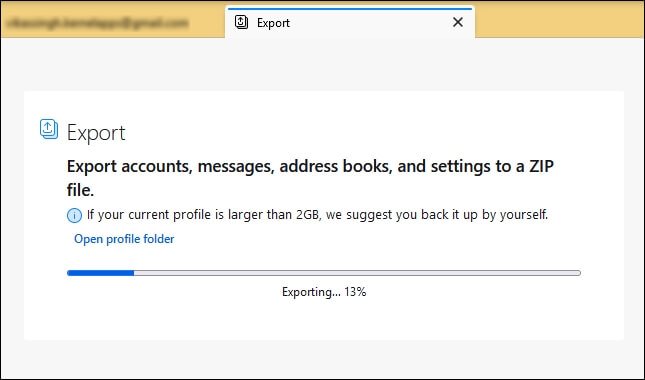
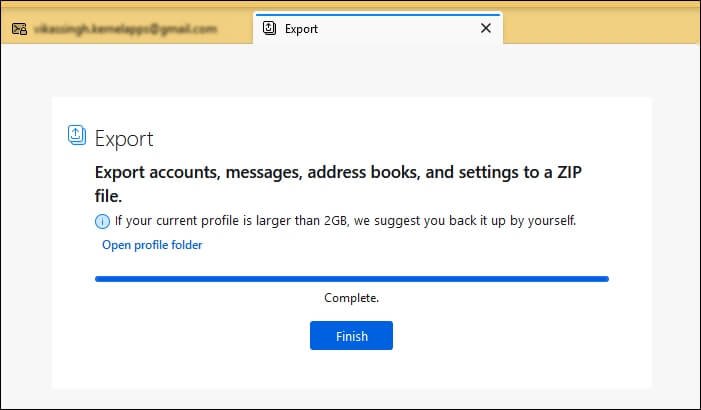
Step 6. Wait for the process to be completed.
Step 7. Open profile folder to view the exported items and click on Finish.
Method 2. Virgilio Mail Backup Using Outlook Application
Import/Export is the best utility of Microsoft Outlook to backup mailbox data. You can use the given steps to backup the entire mailbox:
Note: Set up your Virgilio Mail account in Outlook before using the provided solution.
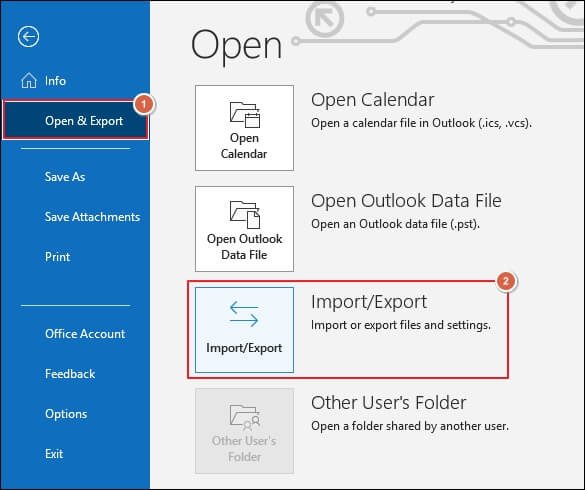
Step 1. Launch Outlook and access the File tab.
Step 2. Go to Open & Export and proceed to the Import/Export option.
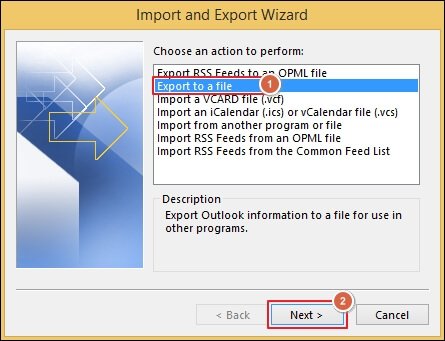
Step 3. Select the Export to a file option and click Next.
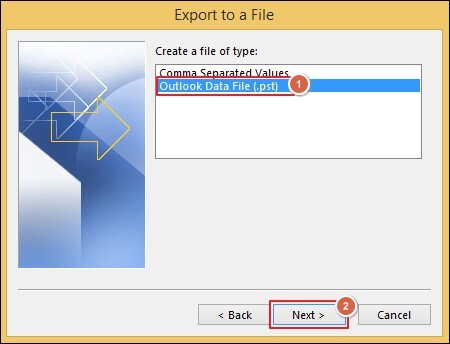
Step 4. Choose the Outlook Data File (.pst) as a file type. Then, proceed to Next.
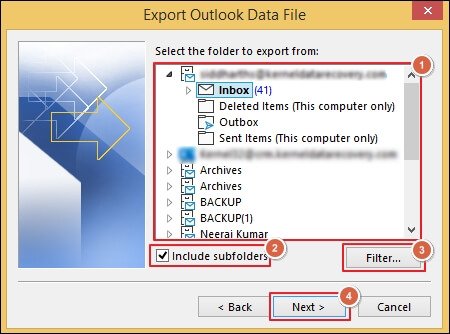
Step 5. Select the required mailbox folder and enable the Include subfolders option.
Step 6. Filter the data for precise output and click Next.
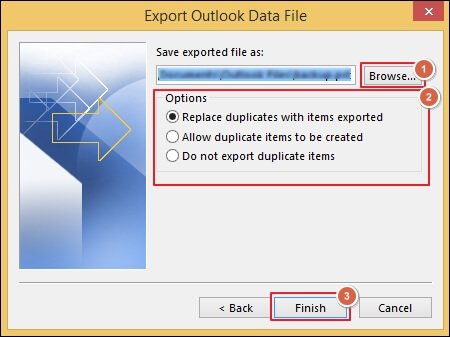
Step 7. Browse to choose the desired file saving location. Then, select appropriate Options and click Finish.
Automate Virgilio Mail Backup with Advanced Tool!
The above-mentioned native solutions will help you backup mailbox data. But these methods require careful execution to get the desired results. On top of that, they often come with several limitations:
- Restrict export of files over the pre-defined limit.
- Limited export options bound users to specific platforms.
- Not able to maintain the email properties and folder hierarchy.
- Struggles to sync the IMAP folders with limited filtering options.
- Slow extraction of mailbox items with data loss or corruption risk.
- The final output file conflicts with different versions of the same platform.
If you want to avoid all this and are looking for a direct solution, then Recoveryfix IMAP Backup tool will be the best. The IMAP Backup software helps to export mailbox data in PST, HTML, DOCX, PDF, MSG, MHT, DOC, and EML formats.
Ending Note
Here, we have covered a detailed guide to perform Virgilio Mail Backup using the manual solutions. You can choose either Thunderbird or Outlook to backup mailbox data as per your suitability. But also consider the risk that comes with manual solutions before mailbox backup. If you want this, go with the recommended solution to export mailbox items without any restrictions.