How to convert MBOX to Office 365?

Updated On - May 20, 2024
Nowadays, we see a common trend of cloud adaptation, which has led to data migration being accepted by various large and small business organizations, like MBOX to Microsoft 365. MBOX files are used by several email clients like Thunderbird, Apple Mail, etc whereas Office 365 works with Exchange Mailboxes. Hence there is no direct compatibility between them.
Need reliable & workable solutions for easy conversion? The following write-up will help you to elaborate the best possible methods to perform MBOX to Office 365 migration with ease.
Know scenarios for MBOX to Office 365 Migration
Check out the scenarios where users need to convert MBOX to Microsoft 365:
- To consolidate business emails.
- Improved collaboration & security.
- Get centralized mailbox management.
- Moving to cloud-based infrastructure.
- Thunderbird or Apple Mail to Office 365 migration.
Best practices before MBOX to Office 365 migration
Know the best practices that you need to follow before initiating the MBOX to PST conversion:
- Take a backup of MBOX files.
- Test with the small mailbox first.
- Maintain a proper folder structure.
- Maintain a stable internet connectivity.
- Check the Office 365 mailbox storage limits.
- Disable third-party apps like anti-virus before migration.
Top Method to convert MBOX to Office 365
Let’s understand the best methods to convert MBOX to Microsoft 365 with a complete step-by-step approach.
Note: Since Office 365 supports PST file to store mailboxes, our focus is to convert MBOX to PST with the following methods.
With the Thunderbird built-in utility, users can convert MBOX files to PST that can be further uploaded to Office 365. Here we will import the MBOX file of another Thunderbird profile, followed by using the same destination account in Outlook. Check out the steps below to know its complete implementation:
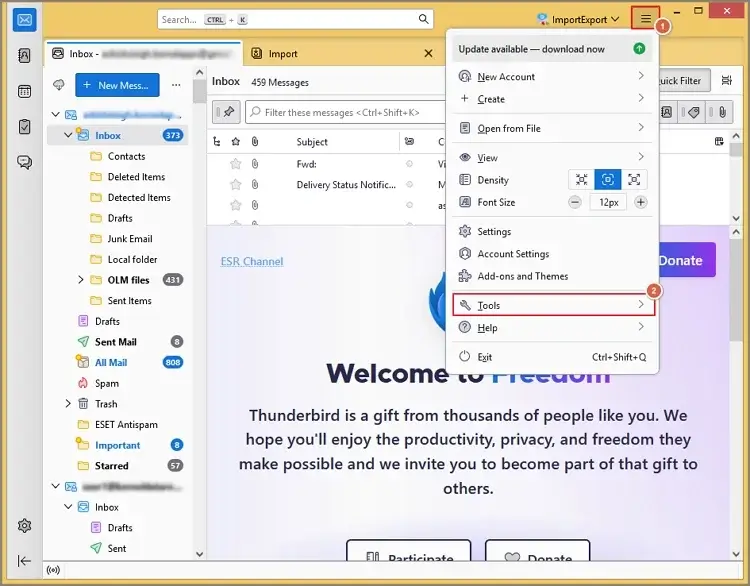
- Open Mozilla Thunderbird. Go to the top right corner & select the Tools option.
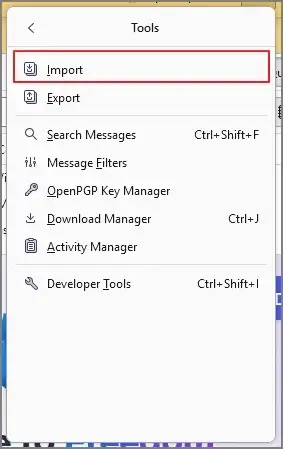
- Tap on the Import option under the Tools section.
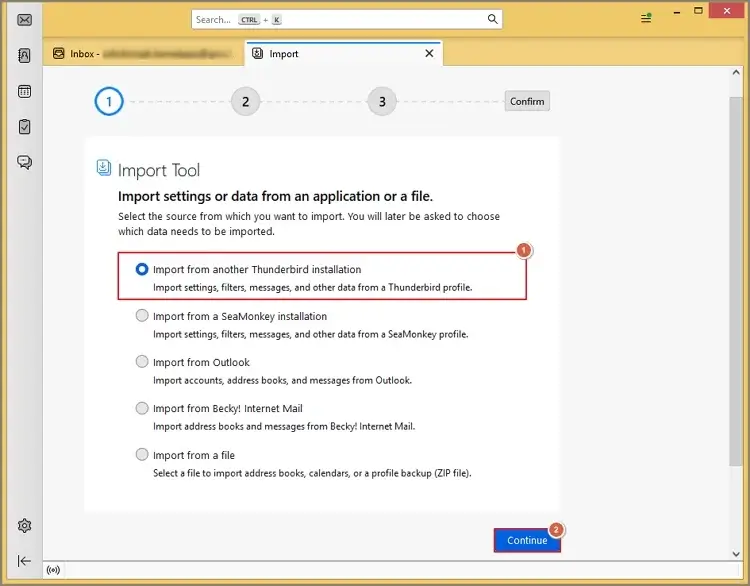
- Select the Import from another Thunderbird installation. Tap on the Continue option.
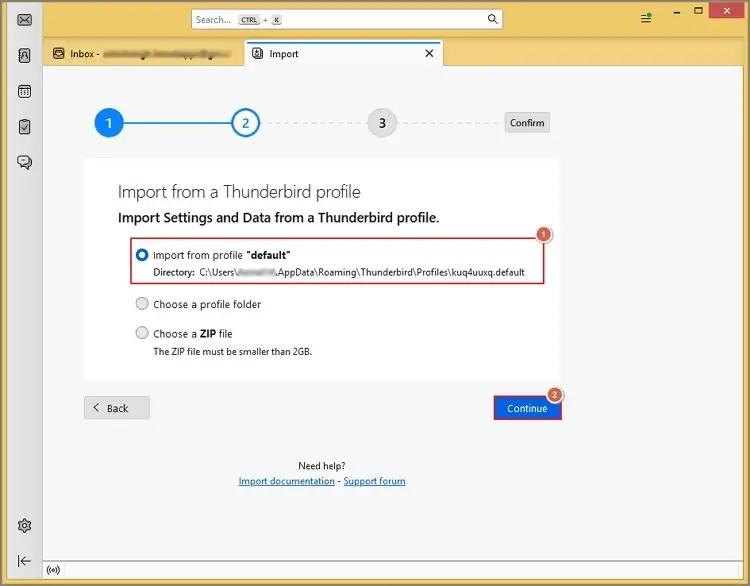
- Click on the Import from profile default & hit Continue.
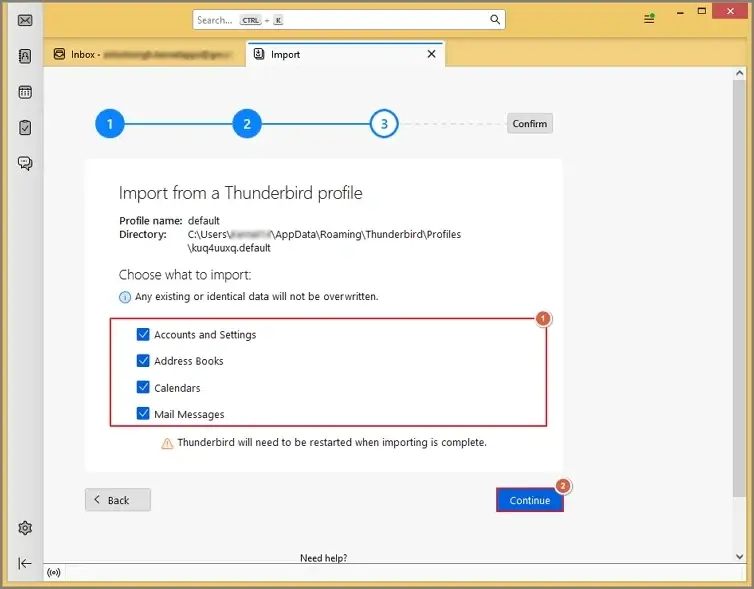
- Choose what to import & select the Continue option.
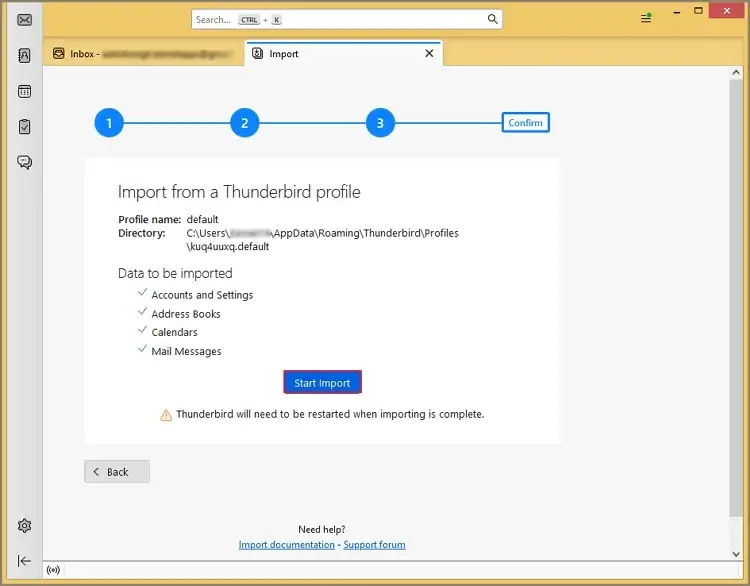
- Hit the Start Import option to begin the importing process.
- Add the same Thunderbird account to Outlook.
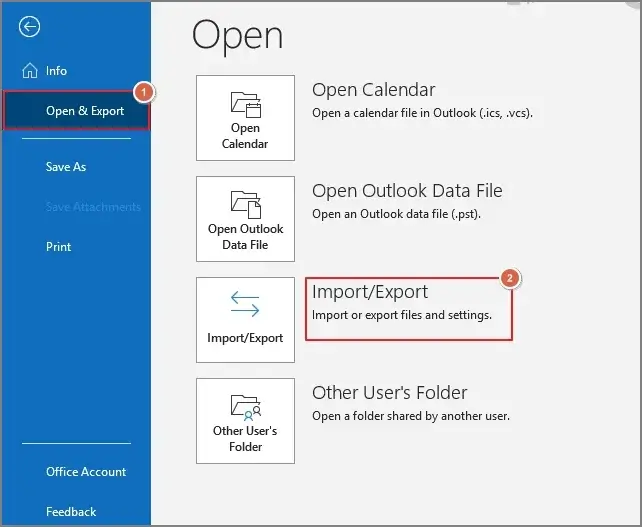
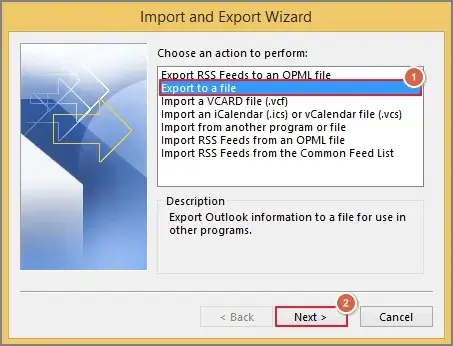
- Choose the Open & Export > Import/Export option.
- Hit the Export to a file > Next tab.
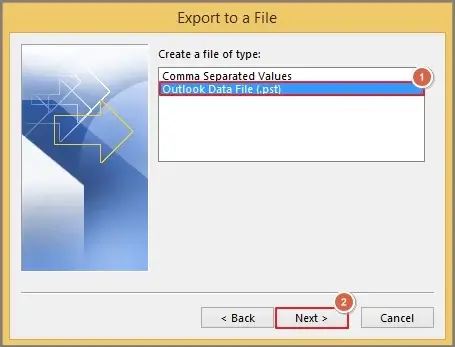
- Choose the PST file as the destination & select the Next tab.
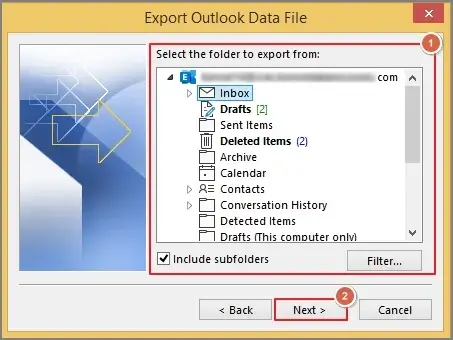
- Select the folder you want to export from the Thunderbird account and click Next.
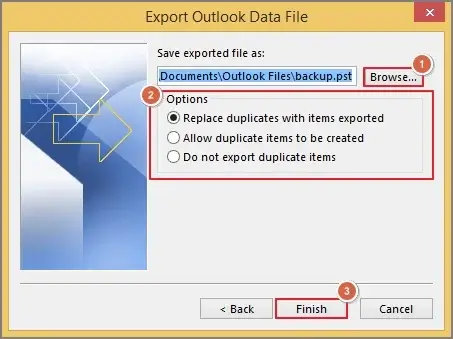
- Browse the destination with suitable Options & click the Finish option to complete the process.
- You can also take the help of other email clients like Apple Mail, Eudora, Outlook Express, etc.
- Once you have converted the MBOX file into the PST, you can use the Outlook PST import job or drive shipping method to use the data in Office 365.
Limitations of the free manual method [Noticeable ones]
Here is the list of some considerable drawbacks that arise while using the manual method.
- Risk of data mismatch arises.
- No automation in bulk migration.
- Folder hierarchy or structure issues.
- Time-consuming process for large ones.
- Need tech-expertise to perform the methods.
- High chances of data redundancy & metadata inconsistencies.
Check out this advanced one for the direct result
As we know, with the manual methods, there are many restraints that can hamper the workflow & make data vulnerable to losses and theft.
That’s why it is recommended to use an automated solution to perform MBOX to Office 365 migration. Recoveryfix comes first in this category with its all-in-one MBOX to PST converter. With the advanced features & innovative filters, users can perform smooth MBOX to Office 365 conversion with accuracy. This tool can also convert MBOX to MSG and EML formats without any hassle.
Top features of the standalone utility
Look at the top features that make it a must-have tool for IT professionals & experts:
- Convert bulk MBOX files into PST & other formats.
- Supports more than 20+ MBOX email clients with ease.
- Retains 100% data integrity & accuracy during conversion.
- Run the MBOX converter without any prior Outlook installation.
- Test the core features of the tool for free up to 25 items per folder.
- Easily work with different file extensions like mbox, mbs, mbx, etc.
- Innovative filters to get the desired results on any Windows version.
Final words
Organizations prefer Office 365 because of its advanced features, ease of use, and security. We’ve listed the best manual method to convert MBOX to Office 365. But with the inherited limitations, it is not recommended for crucial & bulk data. You can go with the suggested advanced one for 100% secure & error-free results. It allows you to export multiple MBOX files to Office 365 within a few clicks.
FAQs
Q-1 Does Office 365 support import MBOX files directly?
A- No. You need to convert MBOX file to PST first before using its data in Office 365.
Q-2 Can I migrate large MBOX files using a free method?
A- To some extent, yes. But it comes with several inconsistencies like slow process & unusual mishaps.