Fix Corrupted or Unplayable Videos from Blackmagic Cameras! [Tested & Verified]

Published On - December 31, 2025
Blackmagic cameras are the most trusted brand among professionals for high-definition recordings. But even this equipment can lead to corrupted video files. If your recorder clips refuse to open, stutter, or show errors, then the chances are likely that the file is damaged. The blog explains the common reasons behind the issues. By the end, you will be able to fix corrupted or unplayable videos from Blackmagic cameras to restore them to their original state.
Why Do Blackmagic Videos Become Unplayable Or Corrupted?
Blackmagic camera video corrupted means the file structure is damaged, incomplete, or unreadable by media players or editing software. The device mainly records in BRAW, MOV, MP4, and ProRes, which rely on proper file finalization.
Whenever interruptions happen during the file saving process, it corrupts the video file. As a result, the video exists but won’t play.
The video corruption is primarily of two types:
- Partial Corruption: Video file opens but freezes, stutters, or shows visual glitches.
- Completely Unplayable: Shows playback errors, or the video file won’t open at all.
Top Reasons Behind Blackmagic Video File Corruption!
Here is the list of issues that are most frequently reported by Blackmagic users across forums and editing communities.
- Slow or incompatible storage media.
- Camera firmware or codec mismatch.
- File transfer interruptions or system errors.
- Recording high-bitrate footage without certified media.
- Accidental removal of the SD Card during active recording.
- Sudden battery drain or camera shutdown while recording.
Identify Blackmagic Camera Video Corruption: Know Warning Signs!
Look for these indicators that help you detect video corruption. Here they are:
- Audio plays, but video footage is missing.
- The file size is too small or shows 0 KB.
- The video file doesn’t open in any media player.
- The screen turns black or green while playing the video.
- Shows errors like “Cannot play file” or “Unsupported format.”
First Response Guide: Immediate Steps After Blackmagic Camera Video Corruption!
Do the following steps immediately after the Blackmagic Camera Video Corrupted issue to increase the possibilities of footage recovery.
Step 1. Stop using the SD card or SDDs.
Step 2. Don’t make the mistake of formatting the storage devices.
Step 3. Avoid recording new videos on the same media.
Step 4. Create a backup copy of the storage device.
Step 5. Use the copied files for work purposes.
Note: Overwriting video files drastically reduces the repair chances.
Fix Corrupted or Unplayable Videos from Blackmagic Cameras Manually!
This section helps you find the best native solutions to fix the issues related to Blackmagic camera video files.
Solution 1. Repair Corrupted Blackmagic Camera Videos Using VLC
Here are the complete steps to repair the Blackmagic camera video corrupted:
Note: VLC Media Player only repairs the video files in the AVI format. So, first, change the extension of the file to AVI before using this method.
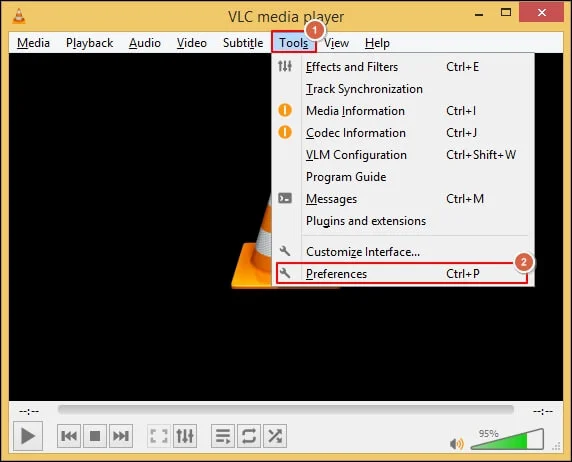
Step 1. Open the VLC Media Player and navigate to Tools. Then, click on Preferences.
Step 2. Go to the Input/Codecs tab and Browse to add the file.
Step 3. Select the Always fix option under the Damaged or incomplete AVI file.
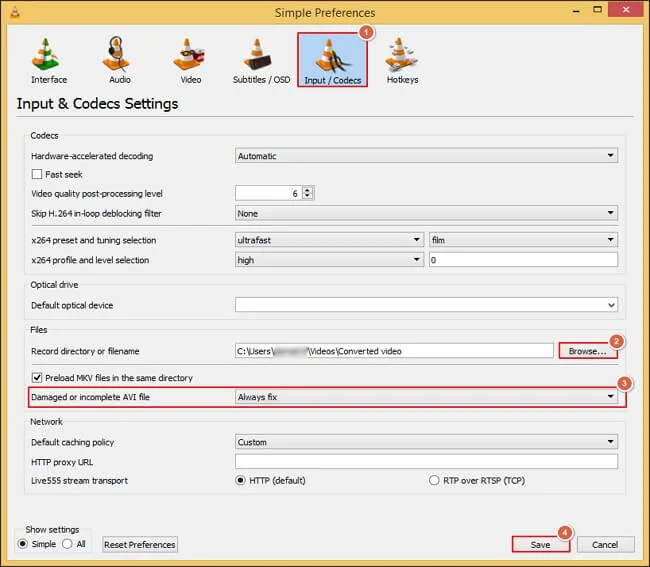
Step 4. It will fix the minor errors from the added files.
Solution 2. Check and Repair the SD Card or SSD
Follow the given instructions to check the storage device using the built-in utility. Here’s how:
Step 1. Connect the SSD or SD card to the system.
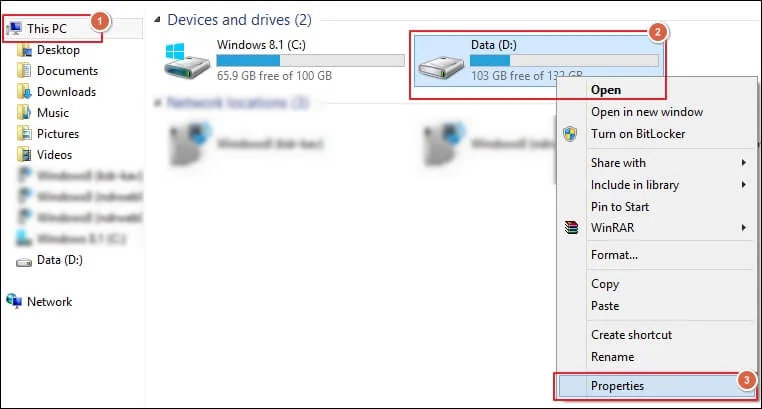
Step 2. Go to This PC in the File Manager.
Step 3. Right-click on the storage device and click on Properties.
Step 4. Navigate to the Tools section and proceed to the Check option.
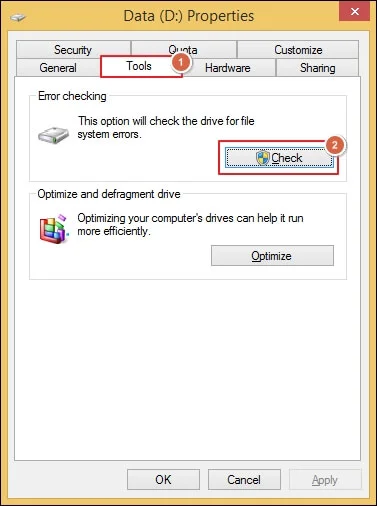
Step 5. It will start diagnosing and repairing the selected storage.
Solution 3. Try to Play the Video in A Different Media Player
Sometimes, the video file is not supported by the current media player you are using. So, check the video first by playing it on another media player.
Step 1. Download and install another media player apart from the current one.
Step 2. Open the unplayable video file in it.
Step 3. Check if the video plays partially or fully.
Step 4. If the video plays, then the issue is codec incompatibility.
Advanced Method: Repair Blackmagic Corrupted Video Files Instantly!
If you are unable to fix corrupted or unplayable videos from Blackmagic cameras, then the file must be highly damaged or corrupted. You can use our Recoveryfix Video Repair Tool to remove the corruption from any video files. The Video Repair Tool is capable of repairing multiple video files at once. It maintains the original clarity, colors, and video resolution throughout the process.
Avoid Future Video Corruption in Blackmagic Cameras: Proven Tips & Tricks!
Follow the given expert tips to keep your Blackmagic camera videos safe.
- Avoid sudden power interruptions.
- Keep the batteries of the camera fully charged.
- Make sure the camera firmware is up to date.
- Safely eject the storage devices from the camera.
- Always use certified high-speed SD cards or SSDs.
- Format the storage media of the camera at regular intervals.
- Never remove storage cards from camera devices while recording.
End Note
The blog has covered a detailed guide to fix corrupted or unplayable videos from Blackmagic cameras via manual methods. You can use them one by one to find the best suitable method. Still, if you are facing the same issue, then use the recommended solution for better results. Its simple user interface allows both beginners and professional users to repair the video files without taking assistance from anyone.