Imagine you are working on important emails, but your Outlook crashes, and you can’t access them now. Frustrating, right? OST files are associated with Outlook and become useless if the account is deleted or corrupted.
But the good news is that you can convert OST to EML and regain access to your emails again. Here, we will explore why you need to perform the conversion and walk you through the best methods to convert emails safely.
Why Do You Need to Convert OST To EML? [Reasons Explained]
There are several reasons for converting OST files to EML format. But we have listed the most significant ones below:
- Easily access OST file data in multiple email clients, including Outlook.
- Backup individual emails with attachments for audits & other purposes.
- Migrate emails to a different email client using the broad support of EML files.
- Share data through emails, cloud storage, or external drives in a universally accepted format.
How to Convert OST to EML Files? - Know Complete Info
There are two primary scenarios generally reported by users for OST file conversion. When:
- Case I. OST files are connected to Exchange or another associated account
- Case II. OST files are disconnected, orphaned, inaccessible, unlinked, or standalone
So, let's discuss what are the applicable methods to save OST files to EML format.
Case I. OST Files Are Connected
You can convert OST to EML files when they are connected to Exchange or other associated accounts manually. Here are the different ways:
Way A. Save a single email message into EML format at a time with:
- Gmail
- Outlook (new)
- Outlook on the Web (OWA)
Way B. Export multiple email messages to EML format using:
- eM Client
- Apple Mail
- Outlook for Mac
- Mozilla Thunderbird (via ImportExportToolsNG add-on)
- Zimbra Mail (Archive & extract TGZ emails or export them using Zimlets directly)
Know Shortcomings: Why Native Solutions Aren’t Effective All the Time?
Although there are several methods available for OST to EML conversion, they are not always reliable because of their limited applicability. Below, we have listed the most significant ones:
- Works only for Connected OST Files.
- Bulk conversion is quite time-consuming.
- Not able to retain complete email attributes.
- Requires multiple email platforms and third-party add-ons.
- A certain level of technical expertise is required for email conversion.
- Native methods don't support corrupted or damaged OST file conversion.
Case II. OST Files Are Disconnected
Now, you know that manual methods won’t be helpful if you have disconnected, orphaned, inaccessible, unlinked, corrupted, damaged, or standalone OST files. So, using our dedicated Recoveryfix OST to PST Converter tool will be the best approach. The software repairs corrupted OST files and easily converts them into EML format without any size or number restrictions.
Step-By-Step Process to Convert OST to EML Files With Recoveryfix Tool
Step 1. Launch the software, and Let's Start with the OST to PST option.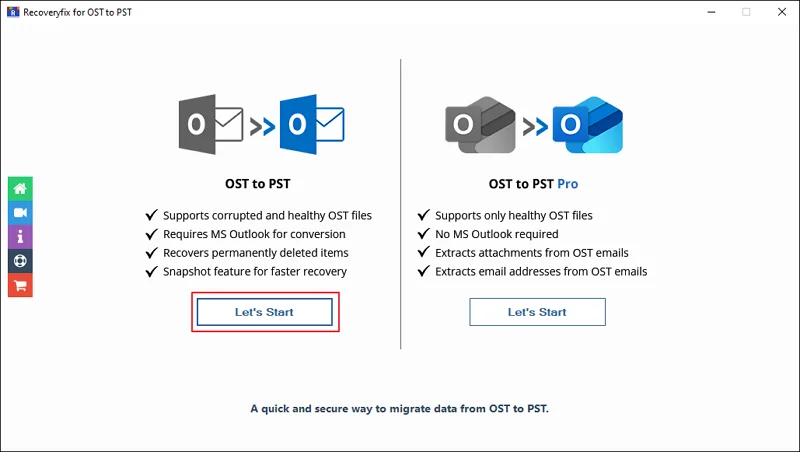
Step 2. Browse to choose single or multiple files and click Next.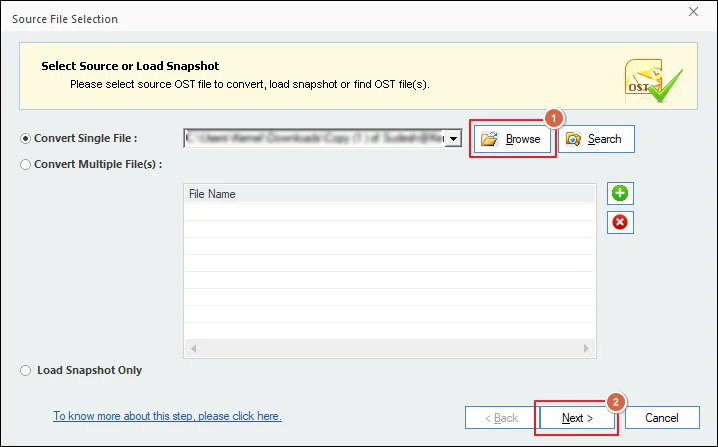
Step 3. Go through the Process Information carefully and hit Finish.
Step 4. Wait till the software loads the OST file data.
Step 5. Preview the mailbox items and select the necessary folders to Save.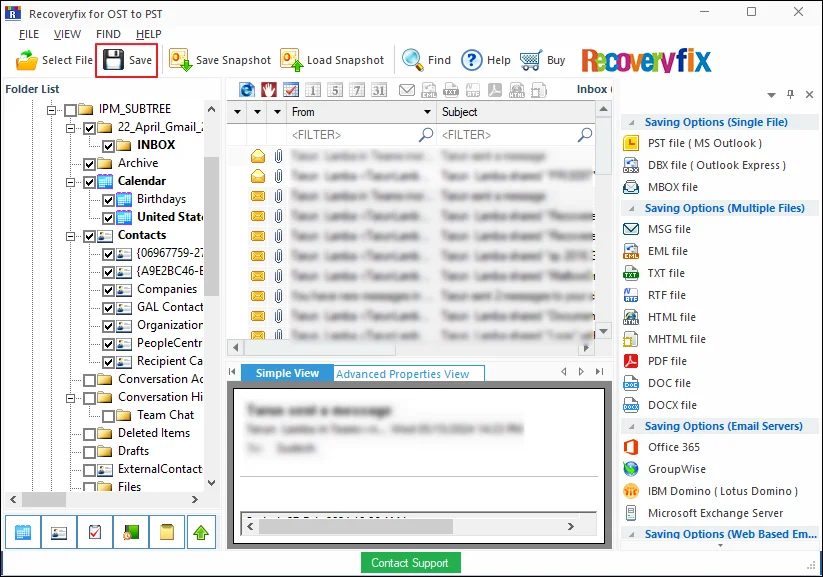
Step 6. Choose the EML file option and proceed to Next.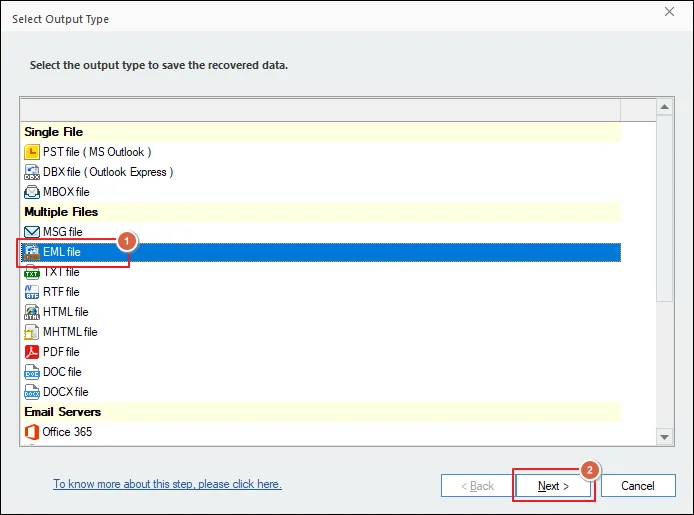
Step 7. Select Filters for specific email conversion and hit Next. 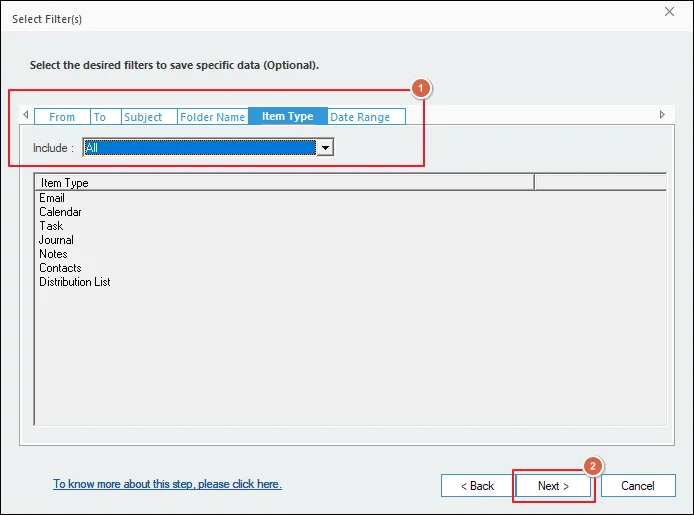
Step 8. Browse to select the file Saving path. Then, choose the Saving Preferences and click Finish.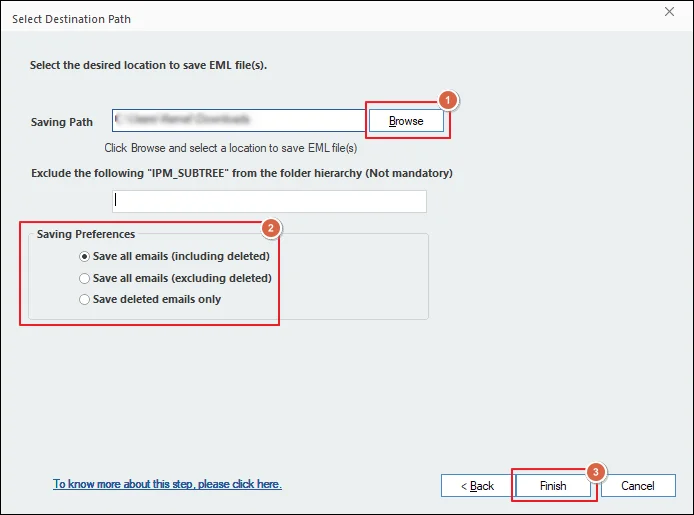
Step 9. The software will start the OST to EML conversion.
Step 10. Once done, click OK to close the software. 
Avail Extra Benefits to Optimize Your Email Conversion Process
Explore the additional features of the software to maximize efficiency when you export OST to EML format.
- Shows a preview of the entire OST file data before conversion.
- Splits the resultant PST file to resolve oversized OST file issues.
- Move OST file data to different email servers or web-based clients.
- Save specific items from the added OST files for precise conversion.
- Converts inaccessible OST files into PST, EML, MBOX, MSG, DOC, PDF & more.
- Restores lost or deleted items from OST files along with their attachments and metadata.
End Thoughts
The blog has covered a detailed guide on different ways to convert OST to EML. It is true that manual methods also exist, but they require time and technical expertise.
On the other hand, the recommended solution simplifies the entire process, even for non-technical users. So, why take any risks? Go with the software to access or transfer OST file data to a new computer without any manual effort.
Need Help? Check Out These FAQs!
Q1. What is the best solution to convert bulk OST files to EML format?
Ans. Recoveryfix solution is the best approach for bulk conversions. The software helps you convert OST file data without losing attachments, contacts, calendars, metadata, and folder hierarchy.
Q2. Do I have to install Outlook to convert OST files while using this software?
Ans.Yes, the Outlook application must be installed on your system for the conversion of corrupted or damaged OST files.
Q3. How can I test the credibility of the software?
Ans.The software comes with a free trial version that allows you to convert 25 items per folder from an OST file. Download the software and test its credibility by yourself.
Q4. Can the tool repair my highly corrupted OST files?
Ans.Yes, the software is especially designed to repair highly corrupted OST files without any difficulties. So, you can rely on this software to restore your orphaned OST files instantly.