Transfer Shaw Email to Gmail: Know How?

Published On - March 30, 2026
With time, email services evolve constantly. As a result, users often migrate platforms to access better features, reliability, & security. A Shaw Webmail to Google Workspace migration is a similar case, as it offers access to modern cloud-based platforms [Gmail] for better productivity.
The right approach is essential to transfer Shaw email to Gmail without data loss. Get all the needed information about the migration with this easy write-up & make your process smooth & hassle-free.
Brief Overview of Shaw Email: It is a Canada-based email service that allows users to send & receive emails through webmail or third-party email clients. Shaw mail accounts usually have domains like @shaw.ca, @shawmail.ca.
Reasons to transfer Shaw Email to Gmail
Get all the possible reasons behind the import Shaw Webmail to Gmail process.
- Better accessibility across devices, like smartphones, tablets, computers, etc.
- Offers significantly large storage compared to traditional email providers.
- Equipped with advanced spam filtering & security protection features.
- Get smooth & easy integration with other Google services like Google Drive, Google Meet, etc.
- Provides long-term reliability with strong infrastructure & better uptime.
- Enable IMAP Access.
- Remove unnecessary emails.
- Verify Shaw account credentials.
- Ensure Gmail has sufficient storage.
Tried & tested solutions to transfer Shaw Email to Gmail
Here, we have provided some common manual methods to migrate Shaw Mail to Gmail. Follow them carefully.
Method 1. Use Gmail’s Add a mail account feature
It is one of the easiest ways to migrate Shaw Webmail to G Suite account using Gmail’s built-in email import feature. Understand the method with the following steps:
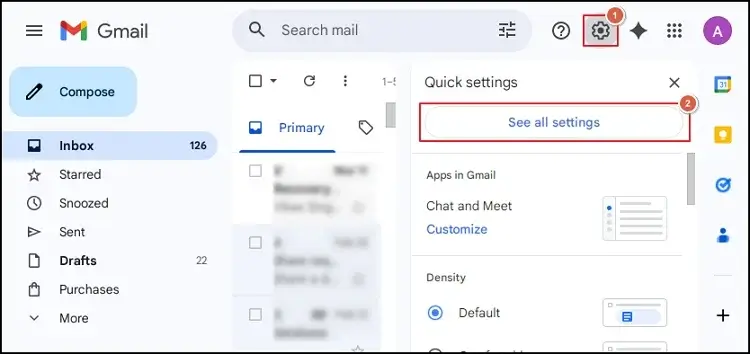
- Login to your Gmail account & hit the Settings icon > See All Settings.
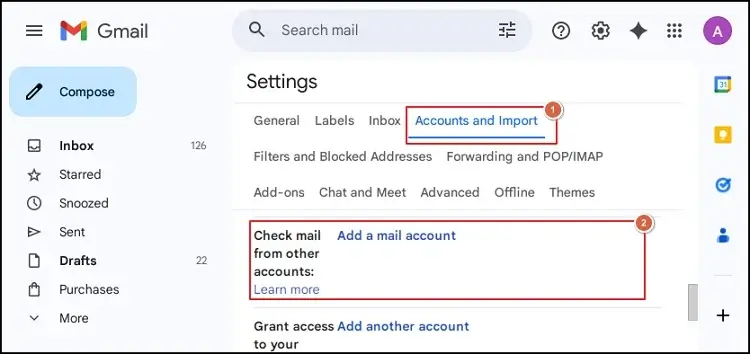
- Choose the Accounts and Import section & hit the Add a Mail Account.
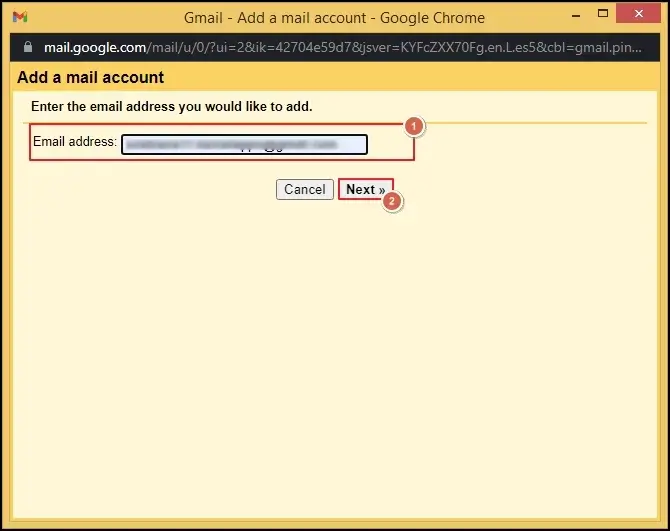
- Provide your Shaw email address & hit the Next option.
- Add the email address by following the upcoming instructions. It will allow you to send & receive Shaw emails from the Gmail interface.
Note: You can also take the help of Import mail & contacts under Accounts & import section to import Shaw Webmail to Gmail.
Method 2. Transfer Shaw email to Gmail using an email client
It is another reliable method where we will take the help of an email client [Like Outlook or Thunderbird] that supports both accounts.
- Install & open the email client.
- Add the Shaw email account using IMAP settings.
- Configure your Gmail account in the same client.
- Allow both accounts to synchronize.
- Select the Shaw Mailbox folders. Drag & move emails into Gmail folders.
Method 3. Try to forward the needed Shaw emails to Gmail
If you are looking for specific Shaw emails, you can try this method. Here, we will use the Forward Settings feature to implement the process. Let’s understand with the steps:
- Login to Shaw webmail & open the email settings.
- Search for the Preferences > Mail section.
- Locate the Receiving Messages section, and hit the Forward a copy to text box.
- Provide your Gmail address with a suitable option. Tap on the Save tab to complete the process.
Common challenges during manual ShawMail to Gmail migration
The provided manual solution comes with certain challenges. Here we have provided the major ones:
- Large mailboxes can delay email synchronization.
- An incomplete transfer may cause attachment issues.
- Lack of smart features can increase the chances of data redundancy.
- Authentication errors, like incorrect credentials, can interrupt migration.
Try a smart solution for easy & quick resolution
Since manual methods may not provide desired results within the short time frame, IT experts recommended going with the advanced solution as the most suitable option. It also saves your crucial data from any unsolicited hazard situations.
Whenever easy tech solutions are needed, Recoveryfix is always the first option to provide an optimized way, like the IMAP Migration Tool. It helps users to migrate complete mailbox data from across IMAP-based email clients, including Shaw Mail, Gmail, Apple Mail, Zimbra, Roundcube, etc. Its advanced features & intelligent algorithms allow users to get the updated data at the needed location.
Tips for successful Shaw email migration
Follow the provided tips to ensure a successful migration.
- Verify the mailbox integrity after the migration.
- Always keep a local backup of important emails.
- Maintain both accounts temporarily until migration is fully confirmed.
- Migrate mailbox data in small batches that reduces the chances of error.
Ending thoughts
Migrating emails between different platforms needs proper planning & execution. We hope the blog has covered all relevant things to transfer Shaw Email to Gmail smoothly with the manual or advanced solution. To avoid any unusual mishaps, follow the steps as provided in the write-up.
FAQs
Q- Will my Shaw email account be deleted after the Shaw webmail to Google Workspace migration?
A- No. Migrating doesn’t automatically delete your Shaw mailbox. You need to close it manually if it is no longer needed.
Q- Is it possible to transfer Shaw email contacts to Gmail?
A- You can export contacts from Shaw Webmail & import them into Gmail using the Google Contacts import feature.