A Complete Guide to Convert OST to MSG Files! [Updated]

Updated On - January 13, 2026
Imagine a situation where you want to share an individual email message with a client or higher authorities for different purposes. So, converting OST to MSG files is the best option in such a case. You can use these MSG files for legal discovery, evidence, or backup without any second thoughts.
Here, the blog will provide tested ways for the OST to MSG export with attachments, metadata, and other email properties intact. Read more to get clear steps to access, archive, and share important emails easily.
Why Do Users Convert OST to MSG Files? – Know Top Reasons!
There are several reasons behind the OST file to MSG conversion. Here are the significant ones that motivate users the most:
- Share individual emails with colleagues, clients, or legal teams.
- Single message files are required for legal, compliance, or eDiscovery needs.
- Keep attachments and metadata intact during the individual emails export.
- Access emails without Outlook when the profile is deleted, corrupted, or unavailable.
- Migrate specific emails to another Outlook profile or system instead of the entire mailbox.
- Archive important emails separately for long-term storage and record-keeping purposes.
How to Convert OST to MSG Files Manually?
This section provides different native solutions to convert OST emails to MSG files. Explore them now:
Solution 1: Use the Save As option of Outlook Application
Outlook’s built-in utility provides the facility for OST file to MSG conversion through simple steps. But this will only work when your Outlook is connected to the Exchange Server. Here are the detailed steps:
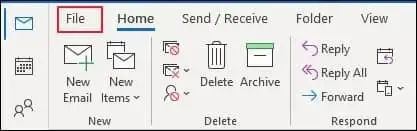
- Launch the Outlook application, select the messages that you want to convert & go to the File menu.
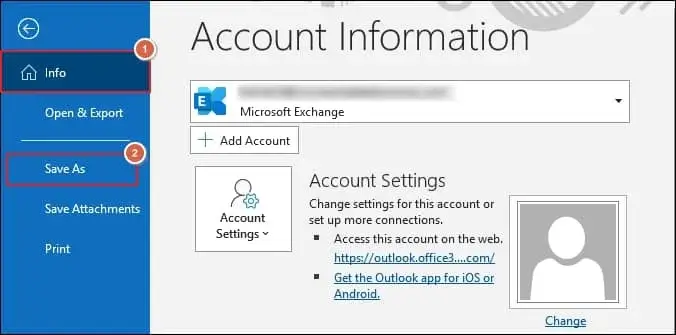
- Now, tap on the Save As option.
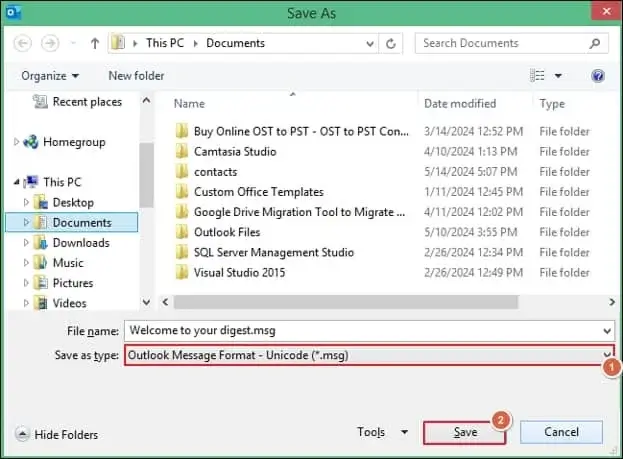
- Select the Outlook Message Format – Unicode (*.msg) option and provide a file name. Then, click on Save.
Solution 2: Try the Drag & Drop feature of Outlook
Users can easily save emails to MSG files from any version of Outlook via drag & drop function. You can use this method to convert OST file to MSG format. For this, the user needs to drag the selected emails & drop them into the folders created on the mainframe of the desktop window. It will reflect your selected OST file in .msg format.
Direct Method: Convert OST to MSG Files Instantly!
While manual methods can be effective in converting your OST file into MSG format, they have their limitations. These methods are only valid when your Outlook is connected to the Exchange Server, or your OST files are in a healthy state.
In unusual situations, a specialized tool like Recoveryfix OST to PST Converter can provide instant and convenient results. The OST to PST Converter tool converts the entire OST file emails into MSG format at once.
Conclusion:
Follow the discussed manual methods with their proper instructions to convert OST to MSG format without any difficulties. However, in case of a missing Outlook profile or a distorted OST file, utilizing the recommended OST Converter tool is preferable to handle the conversion easily. It helps to deal with all OST-associated concerns efficiently, including OST file synchronization issues.