How to Convert OST to HTML files? – Best Guide Available

Published On - April 2, 2026
Imagine you are trying to access an OST file outside of Outlook and realize that it is completely inaccessible. This happens because OST files are tied to specific profiles and environments. So, opening them outside the application is quite a challenge for users.
But the OST to HTML conversion allows you to overcome these obstacles by making your data easily accessible and shareable across platforms. Let’s go through the blog to find effective solutions for converting files with complete steps.
Why Convert OST Files Into HTML? – Know Its Benefits
You can get several benefits by converting OST files. Here they are:
- Ideal for documentation, legal, or backup purposes.
- Single files make the auditing process easy for users.
- Share emails to non-Outlook users without any hassle.
- View the email contents without the Outlook application.
- Access files on any devices like Windows, macOS, Android.
Common Challenges You Face During OST to HTML Conversion
It is important to understand the potential hurdles that may arise during the manual conversion:
- Inaccessible or orphaned OST files.
- Manual conversion contains a data loss risk.
- Limited export options come with native methods.
- Format or structure inconsistencies are quite common.
- Mailbox conversion at a large scale is close to impossible.
Manual Method to Convert OST Files Into HTML Format
You can save the OST file data to HTML files using the Outlook application.
Note: The method only works when the OST file is active and connected to Outlook.
- Launch Outlook and navigate to mailbox folders.
- Select and open the email that you wish to convert.
- Go to the File tab to continue.
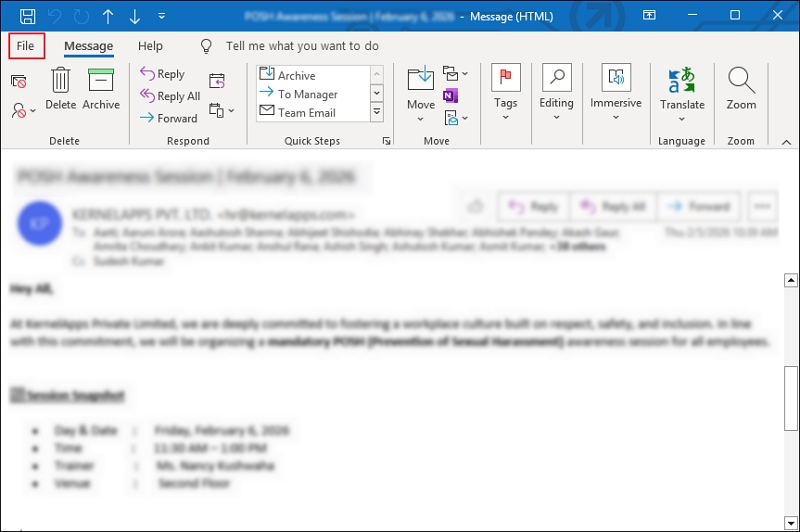
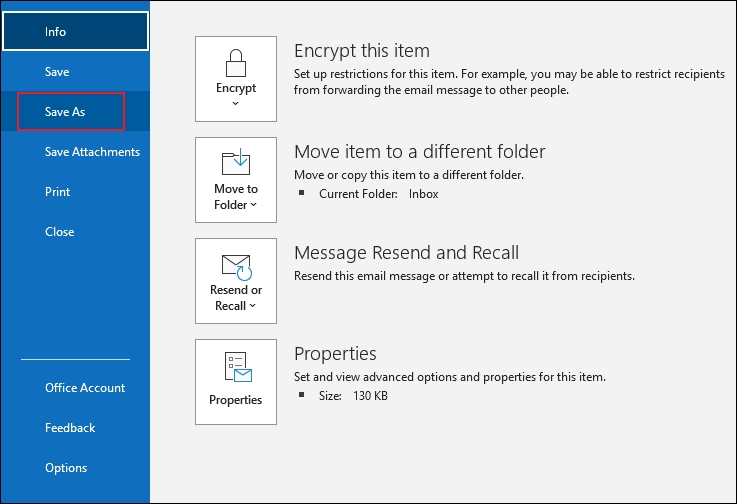
- Then, click on the Save As option.
- Select HTML from the dropdown and tap on Save.
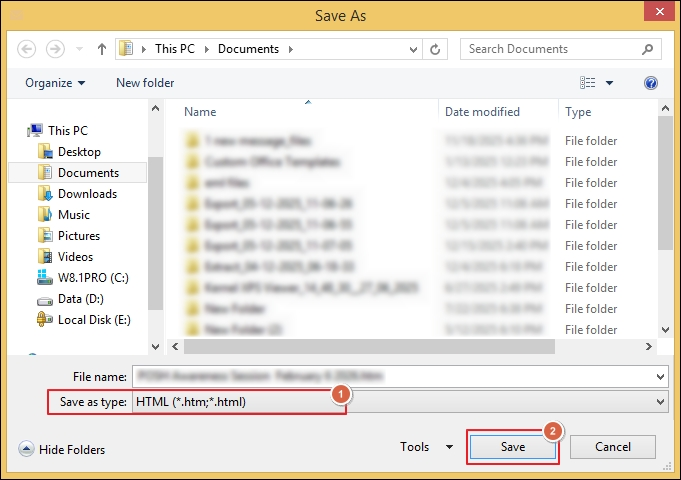
- This will export Outlook OST emails to HTML files.
Why Do You Need An Advanced Solution? – Overcome Limitations
The above solutions will help you to convert OST files to HTML format. But the native solution limits the conversion in the following scenarios:
- Not able to export OST to HTML in bulk.
- Damage, corruption, or inaccessible OST files.
- It comes with the risk of corruption or data loss.
- Inactive profile or disconnect connected OST files.
- Unable to save the attachments along with the emails.
To avoid all these restrictions, using professional solutions will be the best approach. The OST to HTML Converter tool allows you to convert multiple files in a single run. Its advanced filtering options help to perform precise conversion of emails with full control.
Manual Vs Automated Solution: Evaluate to Find The Best
Compare both methods carefully to identify the right one for your needs.
|
Parameters |
Manual Solution |
Advanced Tool |
|---|---|---|
|
Ease of Use |
Moderate |
Easy |
|
Bulk Conversion |
No |
Yes |
|
Speed |
Slow |
Fast |
|
Data Accuracy |
Slow |
High |
|
Supports corrupted or orphaned OST files |
No |
Yes |
Proven Tips for Safe OST to HTML Conversion [Suggested Ones]
Follow the given best practices to improve the accuracy of conversion.
- Test the process on a few emails first.
- Rely on trusted tools for sensitive data.
- Create a backup copy before you start.
- Avoid interruptions during the conversion process.
- Keep your system up to date for better performance.
Final Thoughts
OST to HTML conversion is the practical way to make your Outlook data more accessible, portable, and shareable. You can use the given manual solution to convert your files into HTML format. However, it falls short when you are handling large or orphaned files.
As a result, the recommended solutions become the preferred choice in a professional environment. The software delivers faster results even when the file is corrupted or inaccessible. Also, it provides more export options when compared to the native solution.
FAQs: Read Before You Ask
Q. Is it possible to convert OST files into HTML without Outlook?
A. Yes, you can convert OST files using the professional tool without depending on the Outlook application.
Q. Where do my attachments go after the conversion?
A. Your email attachments are saved separately alongside the HTML format during the conversion via automated software.
Q. Is the OST to HTML conversion safe to perform?
A. Yes, you can use the native solution to convert limited files safely. Also, switch to a professional tool for large-scale data conversion.
Q. Which method should I choose to convert multiple files?
A. You should go with the automated tools to convert large mailbox data into HTML format.